If you are looking for “clout,” go to TikTok. If you are looking for “clients,” go to LinkedIn.
In 2026, many entrepreneurs make the mistake of measuring their success by “Engagement.” They celebrate 100 likes on a selfie, but their bank account remains empty. On LinkedIn, the only metric that matters is the Inbound Lead.
One high-quality lead on LinkedIn can be worth €2,000, €5,000, or even €10,000 in consulting fees. When you understand how to use your smartphone to position yourself as an authority, you stop being a “content creator” and start being a revenue generator.
This guide is your complete operational blueprint for turning simple text-based posts into a high-ticket consulting machine, managed entirely from your phone.
Affiliate disclosure: This post contains affiliate links. If you make a purchase through one of these links, ProBusinessStrategy may earn a small commission at no extra cost to you. We only recommend tools we genuinely believe in.
Part 1: The Psychology of the High-Ticket Lead
Before we talk about formatting, we must understand the “LinkedIn Mindset.”
On other platforms, users are in “Consume Mode” (passive). On LinkedIn, they are in “Problem-Solving Mode” (active). They are looking for ways to save time, make more money, or reduce risk.
To win, your content must satisfy three specific criteria for a decision-maker:
Relevance: Do you understand my specific industry problems?
Competence: Have you solved this problem before?
Efficiency: Can you solve it for me faster than I can?
If your posts don’t hit these three marks, you are just adding to the noise.
Part 2: The “Zero-Fluff” Profile Setup (Your Lead Magnet)
Your profile is not a CV; it is a sales page. When someone clicks your name after reading a post, you have about 3 seconds to prove you are worth their time.
1. The Power Headline (The “I Help” Formula)
Replace your job title with a value statement.
Weak: CEO of LeadGen Agency.
Strong: I help Local Service Businesses (Roofers & HVAC) generate an extra 20 appointments per month using AI-automated Lead Systems.
2. The Featured Section (The “Authority Bridge”)
Use the “Featured” section to link directly to your deep-dive articles on ProBusinessStrategy.com. This moves the lead from LinkedIn’s “rented land” to your “owned land.”
Link 1: Your LinkedIn Business Cornerstone.
Link 2: A case study or free audit tool.
3. The About Section (The “P-A-S” Framework)
Write your About section using:
Problem: Mention the biggest pain point your clients face.
Agitation: Explain why current solutions (or doing nothing) are failing.
Solution: Briefly explain your unique mechanism and end with a clear Call to Action (CTA) like: “DM me ‘SYSTEM’ for a free 15-minute audit.”
Part 3: The 4 Authority Post Templates (Copy & Paste)
You don’t need a viral video. You need these four templates that you can draft in the LinkedIn app on your phone in under 15 minutes.
Template 1: The “Assumption Shredder” (Contrarian Authority)
Goal: Prove you think differently than the average “expert.”
Hook: Why [Common Advice] is actually the reason your [Result] is failing.
Body: Most people tell you to do A. But in 2026, A leads to B (a bad result). We tested C and found that it actually doubles [Result].
The “Why”: [Explain the logic].
CTA: Do you still use [Common Advice]? Let’s discuss in the comments.
Template 2: The “Behind the Dashboard” (Proof of Work)
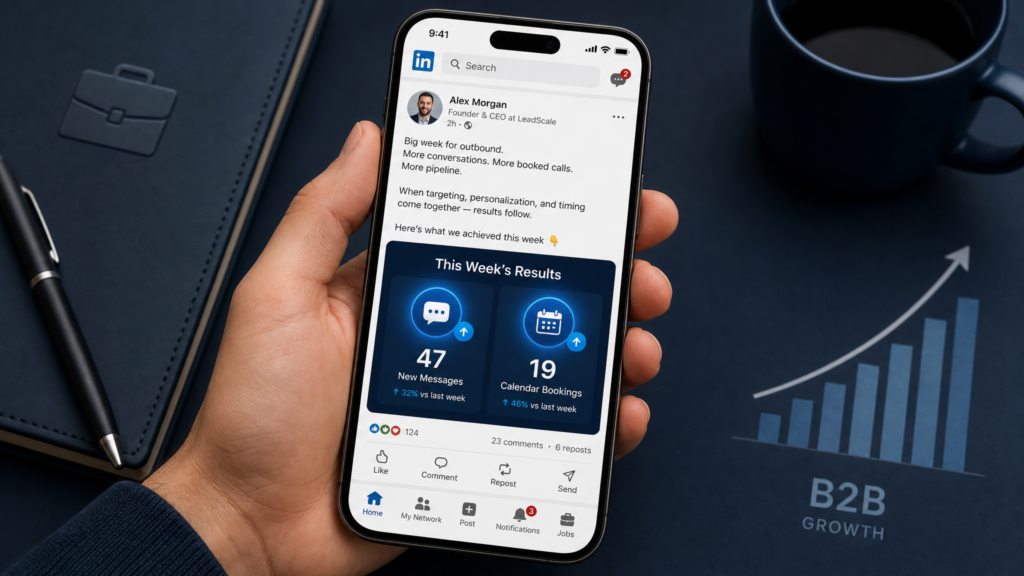
Goal: Show, don’t tell. Use a smartphone screenshot.
Hook: This was the result of a 15-minute tweak for a client in [Niche].
Image: [Screenshot of a ranking, a lead form, or a positive ROI].
Body: We focused on [Specific Metric] instead of [Vague Metric].
Actionable Tip: One thing you can change today is [X].
CTA: Send me a DM if you want to see the full case study.
Template 3: The “Client Conversation” (Relatability)
Goal: Show that you are actively working and solving problems.
Hook: A client asked me today: “How do I [Problem] without [Pain]?”
Body: My answer was a bit unconventional. I told them to ignore [X] and focus entirely on [Y].
Outcome: They saved 10 hours a week and increased [Z].
CTA: Have you faced [Problem] this week?
Template 4: The “Anti-Influencer” (Personal Professionalism)
Goal: Humanize yourself without being “cringe.”
Hook: I’m running my entire consulting business from my phone this week.
Body: Why? Because systems beat offices every time.
Lesson: You don’t need [Expensive Thing]; you need [Correct Strategy].
CTA: Are you team “Office” or team “Smartphone”?
Part 4: The DM Funnel (How to Close from the App)
LinkedIn DMs are where the money is made. But 99% of people do this wrong by being “spammy.”
The “Permission-Based” Script
When someone likes your post or comments:
Check their profile: Are they a target client?
Send a “No-Pressure” DM: “Hey [Name], saw your comment on my post about [Topic]. Just curious, are you currently dealing with [Problem] in your business?”
The Bridge: If they say yes, don’t pitch. Offer a resource. “I actually just wrote a deep-dive on my site about this: [Link to ProBusinessStrategy article]. Give it a read and let me know if it helps.”
The Close: After 2 days, follow up: “Did that article make sense? If you want, we can hop on a 15-minute Zoom to see how to apply it specifically to [Their City/Niche].”
Part 5: Managing the “Consulting Machine” on Your Phone
To be a “Smartphone Consultant,” you need a stack of tools that make you look like a 20-person agency.
The Hub: Everything points back to your Bluehost and WordPress site. This is your “Digital Headquarters.”
Scheduling: Use Calendly integrated into your site. Never say “When are you free?” Say: “Pick a time that works for you here: [Link].”
Outsourcing: If a client hires you for a technical task (e.g., SEO audit), go to Fiverr and find a veteran specialist. You are the strategist; they are the specialists.
Invoicing: Use the QuickBooks mobile app to send an invoice while you are still on the call with the client. Speed builds trust.
Part 6: Daily Operation Schedule (30 Minutes)
You don’t need hours. You need a ritual.
0-10 Mins: Reply to every comment on your recent posts. Every comment is a potential lead.
10-20 Mins: Post your daily “Authority Template” (drafted in your Notes app).
20-30 Mins: Outbound DM strategy. Message 5 new people who fit your “Landlord” or “Local Business” target profile.
Why this Ties into your “Local Ops” Hub
Recall our guides on Local Lead Generation and Property Management.
Those businesses need clients. LinkedIn is how you find them. By positioning yourself as a consultant who understands these “Local Ops,” you can charge premium prices because you aren’t just a “marketer”—you are a specialist who understands the physical reality of their business.
Final Thoughts: The One-Person Media Company
In 2026, the most successful consultants are those who transition from “consuming” to “leading.”
Use LinkedIn as your billboard, your website as your office, and your smartphone as your engine. If you provide genuine value and use these templates to stay consistent, your inbox will soon be full of the only thing that matters: Qualified B2B leads.
Stop worrying about the “algorithm.” Start worrying about the client.
Internal Linking: