Many people see LinkedIn as a place to post business updates, share career news, connect with colleagues, or look for jobs.
But LinkedIn can also be used in a much more strategic way.
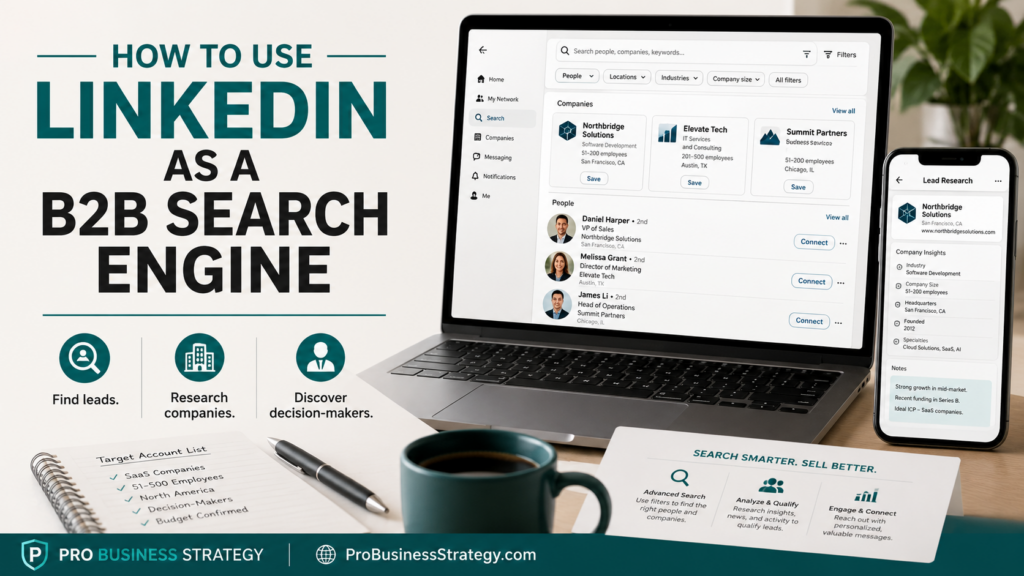
LinkedIn can become a B2B search engine.
For business owners, consultants, freelancers, agencies, coaches, creators, and solopreneurs, this can be extremely useful.
Instead of only waiting for people to find you, you can use LinkedIn to search for companies, decision-makers, industries, content trends, business problems, hiring signals, partnerships, and potential leads.
That does not mean spamming people with cold messages.
It means using LinkedIn as a research tool.
If you know how to search properly, LinkedIn can help you understand who your ideal customer is, what they care about, what problems they discuss, what companies are growing, and where business opportunities may exist.
Affiliate disclosure: This post contains affiliate links. If you make a purchase through one of these links, ProBusinessStrategy may earn a small commission at no extra cost to you. We only recommend tools we genuinely believe in.
Why LinkedIn Works as a B2B Search Engine
LinkedIn is different from most social media platforms.
On TikTok, people often search for entertainment, trends, lifestyle content, or quick ideas.
On Pinterest, people often search for inspiration, tutorials, checklists, and visual solutions.
On LinkedIn, people are connected to their professional identity.
They show their job title, company, industry, skills, work history, content interests, business activities, and professional network.
That makes LinkedIn very valuable for B2B research.
You can search for:
Business owners
Founders
CEOs
Marketing managers
HR managers
Sales directors
Consultants
Coaches
Agencies
Startups
Local companies
Industry specialists
Decision-makers
Potential partners
Competitors
Content creators
Niche communities
This gives you a way to study a market before trying to sell to it.
LinkedIn Search Is Not Only for Leads
Many beginners think LinkedIn search is only about finding people to message.
That is too narrow.
LinkedIn can help with much more than lead generation.
You can use it to:
Research a target market
Understand job titles
Find decision-makers
Study company pages
Discover industry language
Find common pain points
Research competitors
Identify content topics
Find partnership opportunities
Validate a service idea
Build a prospect list
Study hiring trends
Find companies that may need help
This makes LinkedIn useful even before you have a finished offer.
For example, if you are thinking about offering content marketing services to small software companies, LinkedIn can help you find those companies, study their posts, see who works there, understand what they talk about, and identify whether they are actively marketing or hiring.
That is valuable business intelligence.
Start With a Clear B2B Question
Before using LinkedIn as a search engine, start with a clear question.
Do not just search randomly.
Ask something like:
“Who could need this service?”
“What companies are active in this niche?”
“What job title usually handles this problem?”
“What problems are people discussing?”
“Which industries are hiring for this skill?”
“What content gets engagement in this market?”
“Who is already selling something similar?”
“What type of business would benefit from my offer?”
A clear question gives your search direction.
Without that, LinkedIn becomes another endless scrolling platform.
With a clear question, it becomes a research tool.
Search by Job Title
One of the simplest ways to use LinkedIn is to search by job title.
For example:
Founder
Owner
CEO
Marketing Manager
Head of Sales
HR Manager
Operations Manager
E-commerce Manager
Content Manager
Business Development Manager
Agency Owner
Consultant
Coach
The right job title depends on the business idea.
If you sell marketing services, you may search for founders, marketing managers, or content managers.
If you offer hiring support, you may search for HR managers or recruiters.
If you offer automation services, you may search for operations managers, founders, or agency owners.
Job titles help you find the people who may care about the problem you solve.
Search by Industry
LinkedIn can also help you search by industry.
For example:
Real estate
E-commerce
SaaS
Coaching
Consulting
Recruitment
Education
Healthcare
Hospitality
Construction
Logistics
Marketing agencies
Local services
Financial services
Business services
Searching by industry helps you narrow your market.
A broad offer like “I help businesses get more leads” is hard to research.
A more specific offer like “I help real estate consultants get more leads through LinkedIn content” is easier to study.
You can search for people in that industry, read their posts, study their company pages, and see what kind of content already gets attention.
Search by Company Type
Sometimes it is better to search for companies instead of people.
You can look for:
Startups
Small businesses
Agencies
Local service companies
Consulting firms
Software companies
E-commerce brands
Recruitment firms
Training companies
B2B service providers
Company pages can reveal useful information.
Look at:
What they offer
Who works there
How active they are
What they post
Who comments on their posts
Whether they are hiring
What locations they serve
What problems their content suggests
Whether they have a clear marketing message
This can help you decide whether a company is a good fit for your product, service, content, or partnership idea.
Search by Content Topics
LinkedIn is also useful for content research.
You can search for topics like:
Lead generation
AI automation
Remote work
Small business marketing
B2B sales
Hiring challenges
Personal branding
Business growth
Customer retention
Productivity
Startup funding
Content marketing
LinkedIn marketing
Then study the posts.
Look at:
Which posts get comments
Which problems people mention
Which questions appear often
Which opinions create discussion
Which formats work well
Which words people use
Which topics are repeated
This can help you create better content for your own audience.
You are not copying posts.
You are researching what the market already cares about.
Use LinkedIn to Find Pain Points
A business opportunity often starts with a repeated problem.
LinkedIn can help you find those problems.
Look for posts where people say things like:
“We are struggling with…”
“We need help with…”
“One challenge we keep seeing…”
“Many companies are still…”
“The biggest mistake businesses make…”
“We are hiring for…”
“Our team is trying to improve…”
“We are looking for…”
These phrases can reveal demand.
For example, if many small companies are posting about hiring difficulties, that may create opportunities for recruitment services, employer branding content, HR consulting, or hiring automation.
If many founders are talking about content consistency, that may create opportunities for content planning, ghostwriting, video editing, or social media systems.
If many agencies are talking about client onboarding, that may create opportunities for templates, automation, CRM setup, or workflow consulting.
Use LinkedIn to Validate Service Ideas
LinkedIn can be used before you create a full service package.
Imagine you want to offer a service like:
LinkedIn content planning for consultants
AI automation setup for small agencies
Lead magnet creation for B2B coaches
Website audit reports for local businesses
Hiring content for recruitment firms
Newsletter strategy for founders
Before building a full offer, search LinkedIn for the target market.
Ask:
Are these people active on LinkedIn?
Do they post about this problem?
Do they already pay for similar help?
Are competitors offering this?
Do posts about this topic get comments?
Are companies hiring for this role?
Do people ask questions about it?
If you see repeated interest, the idea may deserve more testing.
If you find no signals, the offer may need a different angle.
Use LinkedIn to Build a Prospect List
LinkedIn can also help you build a simple prospect list.
A prospect list does not have to be complicated.
You can track:
Name
Job title
Company
Industry
Location
Profile URL
Problem they may have
Recent post topic
Possible fit
Next action
This helps you stay organized.
Do not treat people like random names in a database.
A good prospect list should be based on relevance.
The more specific your research, the better your outreach can become later.
For example, instead of messaging 100 random founders, you may identify 20 founders who talk about a specific problem your service solves.
That is much stronger.
Use LinkedIn to Study Competitors
Competitor research on LinkedIn can be very useful.
Search for people or companies already serving your target market.
Look at:
What they offer
Who they serve
How they describe the problem
What content they post
Which posts get engagement
What their audience asks
How they position themselves
What their call-to-action is
What gaps you notice
This can help you understand the market.
You may discover that many competitors are too expensive, too technical, too broad, too corporate, or too vague.
That can help you position your own offer differently.
For example, you might decide to create a simpler, beginner-friendly, low-cost, mobile-first, or niche-specific version of a service.
Search for Hiring Signals
Hiring can reveal business needs.
If a company is hiring for certain roles, it may show that they are investing in that area.
For example:
Hiring content marketers may suggest a focus on content growth.
Hiring salespeople may suggest a push for revenue growth.
Hiring operations roles may suggest workflow or scaling challenges.
Hiring customer support roles may suggest growing customer demand.
Hiring automation or data roles may suggest process complexity.
These signals can help you understand what a company is trying to improve.
You do not need to sell to them immediately.
Just use the information to understand the market.
Search for Partnership Opportunities
LinkedIn is not only useful for finding customers.
It can also help you find partners.
For example:
A website designer may partner with a copywriter.
A business coach may partner with a funnel builder.
A TikTok content creator may partner with a video editor.
A finance educator may partner with a spreadsheet template creator.
A LinkedIn consultant may partner with a ghostwriter.
A startup advisor may partner with a legal template provider.
Partnerships can be powerful because you do not always need to build the whole business alone.
LinkedIn makes it easier to find people whose skills or audience complement yours.
Use LinkedIn for Content Ideas
LinkedIn can also become a content idea engine.
Search for your niche and collect common questions.
For example, in a B2B marketing niche, you may find questions like:
“How do I get leads without ads?”
“What should I post on LinkedIn?”
“How do I turn content into clients?”
“How do I choose a niche?”
“How do I write better outreach messages?”
“What is the best way to build authority?”
Each question can become:
A LinkedIn post
A blog article
A YouTube Short
A TikTok video
An email
A service offer
A lead magnet
A consulting topic
This connects well with a content-based business model.
You search the market first.
Then you create content that answers what people already ask.
Use LinkedIn Without Spamming
This is important.
Using LinkedIn as a B2B search engine does not mean sending aggressive cold messages to everyone you find.
Bad outreach damages trust.
Do not send generic messages like:
“Hi, I help businesses grow. Want to book a call?”
That usually feels lazy.
A better approach is to research first.
Understand the person, company, content, and problem.
If you do reach out, make it relevant.
For example:
“I noticed you have been posting about improving your onboarding process. I recently wrote a short checklist for small teams trying to simplify client onboarding. Happy to send it over if useful.”
That is more thoughtful.
The more research you do, the less spammy your outreach becomes.
Build a LinkedIn Search Routine
You can create a simple weekly routine.
For example:
Search one target industry
Find 10 potential companies
Find 10 relevant decision-makers
Read 20 posts in the niche
Save common questions
Identify repeated problems
Add 5 qualified prospects to a list
Create one piece of content based on what you learned
This routine can turn LinkedIn into a business research habit.
You do not need to spend all day on the platform.
Even 30 minutes a few times per week can be useful.
Simple Search Examples
Here are examples of useful searches.
If you offer content services:
Search for “founder content strategy”
Search for “B2B content marketing”
Search for “LinkedIn ghostwriting”
Search for founders in a specific niche
If you offer AI automation:
Search for “AI automation agency”
Search for “operations manager small business”
Search for “workflow automation”
Search for companies hiring automation roles
If you offer website services:
Search for “small business owner”
Search for “consultant website”
Search for local service companies
Search for founders with outdated websites
If you offer lead generation:
Search for “B2B sales”
Search for “lead generation”
Search for “business development manager”
Search for companies posting about growth
The goal is not to search everything.
The goal is to search with intent.
Common Mistakes to Avoid
The first mistake is searching too broadly.
“Business owner” is broad. “Founder of a B2B SaaS company in Europe” is more useful.
The second mistake is focusing only on follower count.
A person with fewer followers may still be a better lead if they have the right problem.
The third mistake is sending messages too early.
Research first.
The fourth mistake is ignoring company pages.
Company pages often show useful context.
The fifth mistake is only looking for leads.
LinkedIn can also help with content ideas, partnerships, competitor research, and niche validation.
The sixth mistake is not tracking what you find.
If you do not save useful information, your research disappears into the feed.
How This Can Become a Business Skill
Using LinkedIn as a B2B search engine can become a valuable business skill.
You could use it for your own business, or you could even turn it into a service.
Possible service ideas include:
B2B lead research
LinkedIn prospect list building
Competitor research
Niche research
LinkedIn content idea research
Decision-maker mapping
Partnership research
Market research for consultants
Business development research
Many business owners do not have time to search properly.
They know they need leads, but they do not know where to look or how to organize the information.
That creates a possible service opportunity.
For example, you could offer a simple package:
“LinkedIn B2B Research List for Consultants”
The deliverable could include:
50 relevant prospects
Company names
Decision-maker profiles
Industry notes
Content activity
Possible pain points
Suggested outreach angle
This is not advanced technology.
It is organized research.
And organized research can be valuable.
Helpful Tools and Support
If you want to use LinkedIn as a B2B search engine, you can start manually with a simple spreadsheet.
Track the person, company, job title, industry, profile link, possible problem, and next action.
But if you do not want to do all the research yourself, you can also outsource parts of the process. On Fiverr, you can find freelancers who offer LinkedIn lead research, prospect list building, company research, data cleanup, LinkedIn profile optimization, outreach copywriting, and CRM support.
This can be useful when you already know your target market but need help building a more organized research list.
The important thing is to stay specific. A focused list of relevant B2B prospects is much more useful than a large list of random contacts.
Final Thoughts
LinkedIn is not only a social platform.
It can be a B2B search engine for business owners.
You can use it to find leads, study industries, research companies, identify decision-makers, discover pain points, validate service ideas, study competitors, and create better content.
The key is to use it with intent.
Do not scroll randomly.
Search with a clear question.
Look for patterns.
Save useful information.
Turn research into action.
If you use LinkedIn this way, it can become one of the most practical business research tools available to solopreneurs, consultants, freelancers, agencies, and B2B service providers.
You do not need to guess who your market is.
You can search, study, learn, and then build your business around real signals.
Internal Linking
Related Articles:
The Complete LinkedIn Business Plan for Solopreneurs
How to Turn LinkedIn Posts Into Consulting Leads
How to Build a LinkedIn Business Without Becoming an Influencer
LinkedIn Business Ideas for Solopreneurs
LinkedIn Personal Branding for High-Ticket Clients From Your Phone