Your smartphone is not only useful for checking email, posting on social media, or replying to customers.
You can also use it to improve your website.
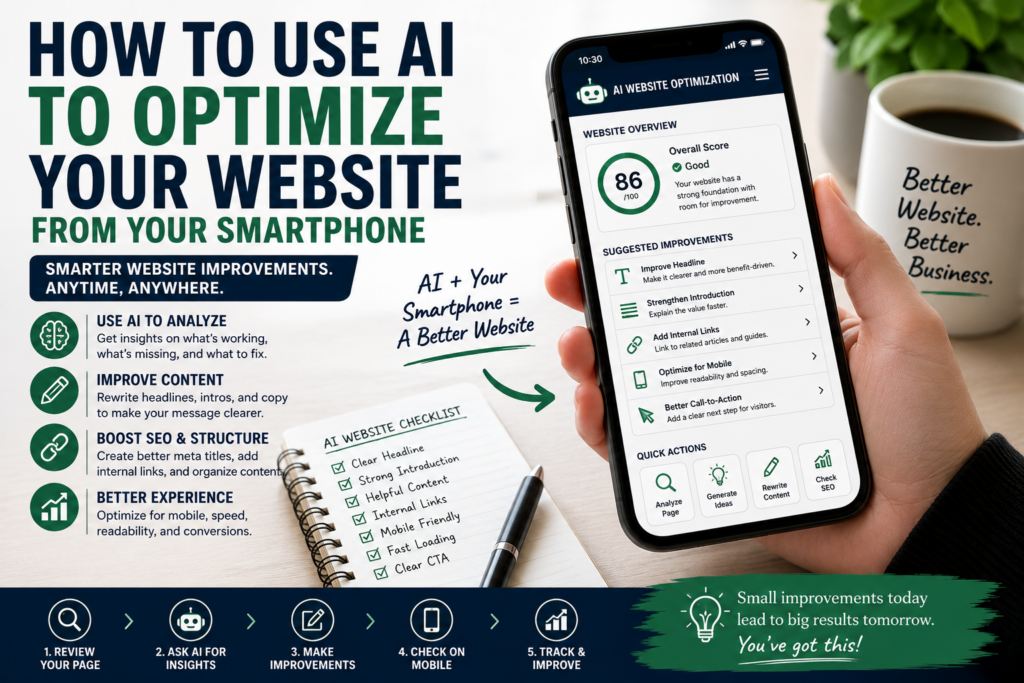
With AI, your phone can become a small website optimization assistant. You can review pages, improve headlines, rewrite introductions, find weak calls-to-action, create better meta descriptions, check content structure, brainstorm internal links, analyze user intent, and plan updates without sitting behind a desktop computer all day.
This is especially useful for bloggers, affiliate marketers, solopreneurs, service providers, e-commerce beginners, local business owners, and anyone running a small online business.
You do not need to be a technical expert to start.
You only need your smartphone, access to your website, an AI assistant, and a simple process.
The goal is not to rebuild your entire website from your phone.
The goal is to use AI to make smarter website improvements, one page at a time.
Affiliate disclosure: This post contains affiliate links. If you make a purchase through one of these links, ProBusinessStrategy may earn a small commission at no extra cost to you. We only recommend tools we genuinely believe in.
Why Website Optimization Matters
A website is not finished when it goes online.
A website needs improvement.
Your first version may have weak headlines, unclear text, slow pages, missing calls-to-action, poor internal links, confusing navigation, or articles that do not fully answer what visitors are looking for.
That is normal.
Many successful websites grow because they are improved over time.
Website optimization means making your website better for visitors, search engines, and business results.
That can include:
Better headlines
Clearer introductions
Stronger calls-to-action
Improved page structure
Better internal links
Faster loading pages
Better mobile readability
Updated content
More relevant affiliate links
Clearer product or service pages
Better meta titles and descriptions
AI can help with many of these tasks.
And because most websites are now viewed on phones, it makes sense to check your website from your phone too.
If your website feels confusing on your smartphone, it may feel confusing to your visitors as well.
What AI Can Help You Optimize
AI can help with website optimization in several practical ways.
It can help you:
Rewrite confusing text
Create better headlines
Improve article structure
Suggest internal links
Find missing sections
Create FAQ ideas
Improve meta descriptions
Simplify complicated language
Generate call-to-action ideas
Summarize page weaknesses
Suggest content updates
Repurpose old content
Compare article angles
Create content improvement checklists
AI does not replace your judgment.
But it can help you see what needs improvement faster.
Sometimes you are too close to your own website. You know what you meant, but the visitor may not.
AI can act like a second pair of eyes.
Start With One Page
The biggest mistake is trying to optimize your whole website at once.
That becomes overwhelming.
Instead, choose one page.
Start with:
Your homepage
A popular blog post
A page with traffic but low clicks
An affiliate article
A service page
A product page
A category page
A landing page
One page is enough.
Open the page on your phone and look at it like a visitor.
Ask:
Is the headline clear?
Does the intro make me want to continue?
Can I understand what the page is about quickly?
Is the text easy to read on mobile?
Are the paragraphs too long?
Is there a clear next step?
Are there relevant internal links?
Does the page match what the visitor probably wants?
Then use AI to help you improve it.
Step 1: Review the Page From Your Phone
Before asking AI for anything, look at the page yourself.
This is important because mobile experience matters.
Check:
Does the page load quickly?
Is the text readable?
Are headings clear?
Are images too large?
Is the layout clean?
Can you find the main message quickly?
Is the menu easy to use?
Are buttons easy to tap?
Does the page feel professional?
Your phone gives you a real visitor experience.
If you need to pinch, zoom, scroll endlessly, or search too hard for the next step, your visitors may have the same problem.
Write down what feels weak.
Then bring those points to AI.
Step 2: Ask AI to Analyze the Page Structure
You can copy part of your page text into an AI assistant and ask for a structural review.
Use a prompt like:
“Review this webpage text as if you are a first-time visitor. Is the structure clear? What is confusing? What should be improved first?”
Or:
“Analyze this article for readability, search intent, headings, missing sections, internal linking opportunities, and call-to-action improvements.”
This can help you find weaknesses quickly.
AI may suggest that the introduction is too slow, the article needs more examples, the headings are too vague, or the call-to-action is missing.
You do not have to accept every suggestion.
Use the ideas that make sense.
Step 3: Improve the Headline
The headline is one of the most important parts of a page.
If the headline is unclear, people may leave before reading.
AI can help you create stronger headline options.
For example, instead of:
“Website Tips”
A better headline could be:
“How to Improve Your Small Business Website Without Hiring a Developer”
Or:
“Website Optimization Checklist for Small Business Owners”
Ask AI:
“Give me 10 clearer headline options for this page. Keep them practical, beginner-friendly, and focused on the visitor’s problem.”
Then choose the one that best matches the page.
For blog posts, the headline should usually be clear before it is clever.
Step 4: Rewrite the Introduction
Many pages lose readers in the first few sentences.
A weak introduction may be too slow, too generic, or too unclear.
AI can help rewrite the intro so it quickly explains:
Who the page is for
What problem it solves
Why the reader should care
What they will learn
A good prompt:
“Rewrite this introduction so it is clearer, more direct, and more useful for a beginner who wants to solve this problem.”
For example, if an article starts with a long general explanation, AI can make it sharper.
The intro should make the reader think:
“This is exactly what I need.”
Step 5: Improve Mobile Readability
Mobile readers need clean formatting.
Long paragraphs are harder to read on a phone.
AI can help you break content into clearer sections.
Ask:
“Improve this text for mobile readability. Keep the meaning, but make the paragraphs shorter and easier to scan.”
Good mobile readability usually means:
Short paragraphs
Clear headings
Simple sentence structure
Useful bullet-style sections when needed
Enough white space
No giant blocks of text
This is especially important for business blogs, affiliate articles, tutorials, and guides.
A visitor may be reading during a break, on a train, at work, or while quickly researching a problem.
Make the page easy to scan.
Step 6: Strengthen Calls-to-Action
A call-to-action tells the visitor what to do next.
Many websites have weak or missing calls-to-action.
Examples of calls-to-action include:
Read the related article
Download the free guide
Join the email list
Compare the tools
Book a consultation
Start with this checklist
Visit the recommended resource
Explore more business ideas
AI can help you create natural calls-to-action that fit the page.
Ask:
“Suggest 5 call-to-action options for this article. They should feel helpful, not pushy.”
A good call-to-action should match the reader’s current stage.
If the reader is just learning, a soft CTA may work better.
If the reader is ready to act, a stronger CTA may fit.
Step 7: Add Better Internal Links
Internal links help visitors move through your website.
They also help connect related topics.
AI can help you find where links should go.
For example, if you have an article about optimizing a website from your phone, it may naturally link to a guide about using ChatGPT from your phone for business or a broader list of businesses you can run from your phone.
Relevant internal links are useful because they keep visitors on your website longer and guide them to the next helpful article.
For this topic, useful related articles could include:
How to Use ChatGPT From Your Phone for Business
50 Businesses You Can Start From Your Phone
How to Create a YouTube Affiliate Channel From Your Smartphone
Do not force links just to have links.
Only link when the next article truly helps the reader.
Step 8: Improve Affiliate Placement
If your website uses affiliate marketing, AI can help you place affiliate links more naturally.
The mistake is adding affiliate links randomly.
A better approach is to match the tool to the reader’s problem.
For example, if someone is optimizing a website but does not yet have a proper website, a website builder or hosting recommendation may fit.
If someone needs help fixing design, copy, SEO, speed, or formatting, outsourcing can fit.
For example, Fiverr can be relevant if the reader wants help with website audits, SEO improvements, page speed support, copywriting, landing page design, or technical fixes.
If the reader is still building their website, Bluehost or WordPress Website Builder may fit naturally.
If the article is about a more serious WordPress or WooCommerce website, Pressable WooCommerce Hosting may be relevant.
The key is context.
Affiliate links should feel like useful resources, not interruptions.
Step 9: Create Better Meta Titles and Descriptions
A meta title and meta description help describe your page in search results.
AI can help create options.
Ask:
“Create 5 SEO title options and 5 meta descriptions for this article. Keep them clear, search-friendly, and under normal search result length.”
For example:
SEO Title:
How to Use AI to Optimize Your Website from Your Smartphone
Meta Description:
Learn how to use AI from your smartphone to improve website headlines, content, mobile readability, internal links, calls-to-action and SEO basics.
AI can give you several versions quickly.
Then you choose the best one.
Step 10: Find Missing Sections
Sometimes an article is good, but incomplete.
AI can help identify missing sections.
Ask:
“What important questions does this article not answer yet?”
Or:
“What would a beginner still want to know after reading this?”
AI may suggest adding:
Examples
Checklist
Common mistakes
Tool recommendations
Step-by-step workflow
FAQ section
Mobile-specific tips
Beginner warnings
Next steps
This can make your article more complete.
It can also help your content match search intent better.
Step 11: Create an FAQ Section
FAQ sections are useful because they answer common reader questions.
AI can help generate relevant questions.
For example:
Can I optimize my website from my phone?
What website tasks can AI help with?
Can AI improve my SEO?
Should I trust AI recommendations completely?
Can AI help rewrite website content?
Do I still need a web developer?
You can then answer these questions in simple language.
FAQ sections are especially useful for beginner-focused articles because beginners often have practical questions.
Step 12: Check the Website Like a Customer
After using AI, check the page again from your phone.
Do not only look at the text.
Look at the experience.
Ask:
Can I understand the page quickly?
Is the next step clear?
Do the links make sense?
Does the page feel trustworthy?
Is the content easier to read now?
Would I stay on this page?
Would I click another article?
Would I trust the recommendation?
AI can help optimize, but you still need human judgment.
A page must feel useful to a real person.
Website Areas You Can Optimize With AI From Your Phone
You can use AI to improve many parts of your website.
Homepage
Your homepage should quickly explain what your website is about.
AI can help improve:
Headline
Subheadline
Intro section
Category descriptions
Button text
Homepage structure
Featured article sections
Email signup text
For example, if your homepage gets traffic but visitors leave quickly, AI can help brainstorm better ways to guide them into your article categories.
Blog Posts
Blog posts are often the easiest pages to optimize.
AI can help improve:
Introductions
Headings
Examples
Internal links
Conclusion
FAQ sections
Meta descriptions
Affiliate placement
Related articles
Old blog posts can often become much stronger with simple updates.
Category Pages
Category pages are important because they guide visitors into a topic.
AI can help you write better category introductions.
For example:
Phone Business
AI Business Ideas
Marketing & Growth
Starting a Business
Home-Based Business
A good category page should explain who the category is for and what the visitor can find there.
Product or Service Pages
If you sell something, AI can help make the offer clearer.
It can improve:
Problem statement
Benefits
Features
Objections
FAQ
Call-to-action
Comparison sections
Testimonials structure
The goal is to make the page easier to understand and easier to act on.
Landing Pages
Landing pages need clear focus.
AI can help improve:
Headline
Offer explanation
Lead magnet title
Opt-in copy
Button text
Trust section
FAQ
Follow-up email ideas
For example, if you offer a free guide, AI can help you create a stronger opt-in section.
A Simple Mobile Website Optimization Routine
Here is a simple weekly routine.
Choose one page.
Open it on your phone.
Write down three weaknesses.
Copy the page text or section into AI.
Ask for improvement suggestions.
Choose one or two changes.
Update the page.
Check it again on mobile.
Track what you changed.
This routine can be done in 20 to 30 minutes.
If you improve one page every week, your website can become much stronger over time.
Useful AI Prompts for Website Optimization
Here are prompts you can use from your smartphone:
“Review this page for clarity and visitor experience.”
“Rewrite this introduction to be more direct and beginner-friendly.”
“Suggest better headings for this article.”
“Find missing sections in this blog post.”
“Suggest internal links that would help the reader.”
“Create a stronger call-to-action for this page.”
“Improve this paragraph for mobile readability.”
“Create SEO title and meta description options.”
“Turn this article into a checklist.”
“Suggest FAQ questions for this topic.”
“Analyze this page as if you are a first-time visitor.”
These prompts make AI more useful because they give it a clear task.
What AI Cannot Do Perfectly
AI is helpful, but it is not perfect.
It may suggest generic improvements.
It may misunderstand your audience.
It may recommend changes that do not fit your brand.
It may create text that sounds too polished or too vague.
It may miss technical issues like code problems, plugin conflicts, server problems, or tracking errors.
That is why you should use AI as an assistant, not as the final authority.
For technical fixes, legal issues, advanced SEO, analytics setup, or serious website problems, it may be better to get professional help.
Common Website Optimization Mistakes
Avoid these mistakes:
Trying to optimize everything at once
Changing pages without a clear goal
Adding too many affiliate links
Ignoring mobile readability
Writing for AI instead of humans
Using vague calls-to-action
Not checking the page on a phone
Ignoring site speed
Forgetting internal links
Not tracking what you changed
Optimization should make the page better, not more complicated.
How This Can Become a Phone-Based Service
There is also a business opportunity here.
Many small business owners know their website needs improvement, but they do not know where to start.
You could offer a simple mobile-friendly website review service.
For example:
“AI-Assisted Website Review for Small Business Owners”
The deliverable could include:
Homepage review
Mobile readability notes
Headline suggestions
CTA suggestions
Internal link ideas
SEO title and meta description ideas
Content improvement checklist
Three priority actions
This can be done as a lightweight service, especially for small websites.
You do not need to promise technical SEO miracles.
You can position it as a practical website clarity and content review.
That is valuable for beginners and small business owners who feel stuck.
Final Thoughts
Using AI to optimize your website from your smartphone is not about doing everything perfectly.
It is about making small, useful improvements.
Your phone helps you see the website like a real mobile visitor.
AI helps you find weaknesses, rewrite text, improve structure, create better calls-to-action, suggest internal links, and plan updates.
Together, they can make website optimization much easier.
Start with one page.
Ask better questions.
Make one improvement.
Then repeat.
Over time, these small updates can create a website that is clearer, more helpful, more professional, and better connected to your business goals.
Internal Linking
Related Articles:
How to Use ChatGPT From Your Phone for Business
50 Businesses You Can Start From Your Phone
How to Create a YouTube Affiliate Channel From Your Smartphone