A business website is not only about design, traffic, content, and affiliate links.
It also needs trust.
When someone visits your website, they want to know who is behind it, what the site does, how their information is handled, and what rules apply when they use your content, products, services, links, downloads, or recommendations.
That is why pages like a Privacy Policy and Terms of Use matter.
They may not be the most exciting pages on your website, but they help create a more professional foundation.
For a beginner entrepreneur, blogger, affiliate marketer, e-commerce owner, coach, consultant, digital product creator, or home-based business owner, legal website pages can feel confusing.
You may wonder:
Do I really need a Privacy Policy?
Do I need Terms and Conditions?
What about cookies?
What if I use affiliate links?
What if I collect emails?
What if I sell digital products?
What if my audience is international?
The exact requirements depend on your country, your audience, your business model, and what your website does.
But the basic idea is simple:
If your website collects information, recommends products, uses tracking tools, runs ads, collects emails, sells products, or publishes business content, you should take your legal pages seriously.
This article explains the main website legal pages beginners should understand and what they usually need to include.
It is not legal advice, but it will help you think more clearly about what your website needs.
Affiliate disclosure: This post contains affiliate links. If you make a purchase through one of these links, ProBusinessStrategy may earn a small commission at no extra cost to you. We only recommend tools we genuinely believe in.
Why Legal Pages Matter
Legal pages are not just there to “look official.”
They have real business value.
They help you:
Build trust with visitors
Explain how your website works
Set expectations
Reduce confusion
Protect your content
Explain affiliate relationships
Describe how personal data is handled
Clarify limitations of your advice
Create a more professional website
Prepare your business for growth
Many beginners ignore these pages because they seem boring.
But that is a mistake.
A website without basic legal pages can feel unfinished, especially if it collects emails, recommends products, or sells anything.
Visitors may wonder:
Who owns this website?
What happens if I enter my email?
Are these affiliate links?
Can I trust this advice?
What if I buy something through this site?
Can I copy this content?
How do I contact the owner?
Good legal pages answer those questions.
The Most Important Website Legal Pages
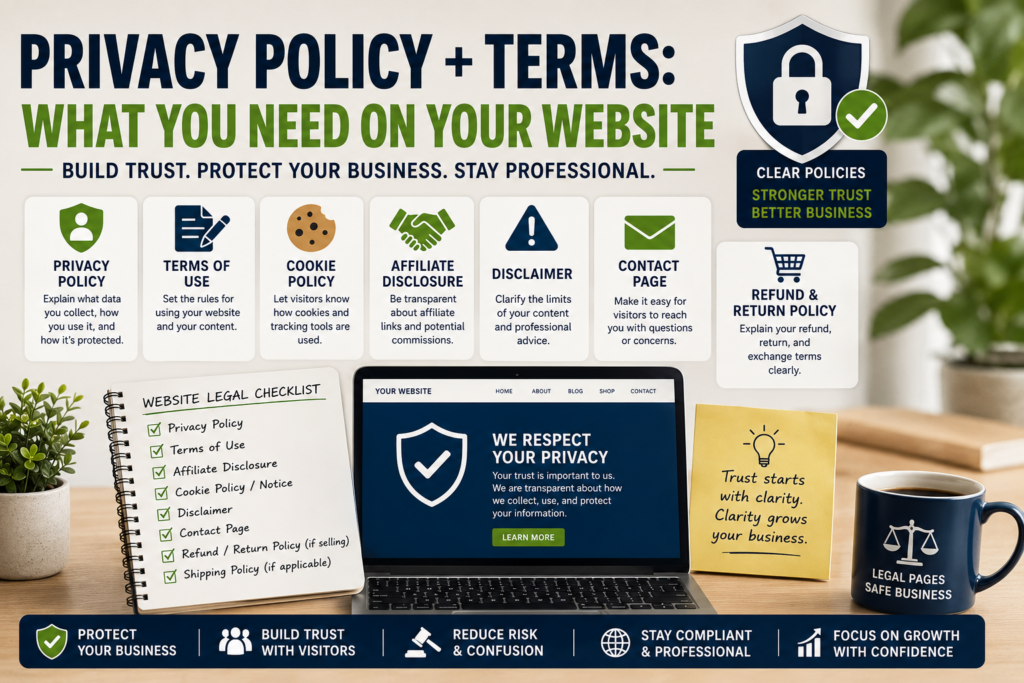
Not every website needs the exact same pages, but most business websites should consider these:
Privacy Policy
Terms and Conditions or Terms of Use
Cookie Policy or Cookie Notice
Affiliate Disclosure
Disclaimer
Contact page
Refund Policy, if selling products
Shipping Policy, if selling physical products
Return Policy, if selling physical products
For many beginner content websites, the most important pages are:
Privacy Policy
Terms of Use
Affiliate Disclosure
Disclaimer
Contact page
If you collect emails, use analytics, run ads, or use affiliate links, these become even more important.
1. Privacy Policy
A Privacy Policy explains how your website collects, uses, stores, shares, and protects personal information.
This is one of the most important legal pages for a website.
Personal information can include things like:
Name
Email address
IP address
Contact form details
Payment details
Account information
Analytics data
Cookie data
Location data
Device information
Newsletter signup information
Even a simple blog may collect some data through analytics, cookies, contact forms, email signup forms, affiliate tracking, or ad networks.
That means a Privacy Policy is usually not optional for a serious business website.
What a Privacy Policy Should Explain
A good Privacy Policy should usually explain:
What information you collect
How you collect it
Why you collect it
How you use it
Who you share it with
How long you keep it
How users can contact you
What rights users may have
How cookies or tracking tools are used
How email subscribers can unsubscribe
How third-party services may process data
How you protect information
When the policy was last updated
The goal is transparency.
A Privacy Policy should not be written to confuse people.
It should help visitors understand what happens when they use your website.
Example Privacy Policy Topics
For a business content website, your Privacy Policy may need to mention:
Google Analytics or similar analytics tools
Email marketing platform
Contact forms
Affiliate links
Advertising networks
Embedded videos
Social media links
Cookies
Comment forms
Payment processors
Digital product checkout tools
Website hosting provider
Security tools
The more tools your website uses, the more carefully you need to explain them.
2. Terms and Conditions
Terms and Conditions, sometimes called Terms of Use, explain the rules for using your website.
This page is different from a Privacy Policy.
A Privacy Policy is about data.
Terms and Conditions are about website rules, responsibilities, limitations, and rights.
For example, your Terms can explain:
Who can use the website
How visitors may use your content
What users are not allowed to do
That your content is for informational purposes
That you can update or remove content
That you are not responsible for third-party websites
That affiliate links may lead to external sites
That you own your content
That users should not copy or misuse your materials
That digital products or services may have specific conditions
This page helps set boundaries.
Why Terms Matter for Content Websites
If you publish business advice, ideas, affiliate recommendations, or guides, Terms of Use can help clarify that your content is educational and informational.
For example, if your site explains business ideas, pricing, affiliate marketing, funding, or legal formation, a reader should understand that they are responsible for their own decisions.
You can provide guidance.
But you are not personally responsible for how every reader applies that guidance.
That distinction matters.
3. Disclaimer
A Disclaimer explains the limits of your content.
This is especially important if your website discusses topics like:
Business
Finance
Legal formation
Taxes
Investing
Health
Insurance
Funding
Affiliate marketing
Income ideas
Pricing
E-commerce
Software tools
A disclaimer can explain that your content is for general educational purposes and should not replace professional advice.
For example:
Business content does not replace legal advice.
Finance content does not replace advice from a financial professional.
Tax content does not replace advice from an accountant.
Legal formation content does not replace advice from a lawyer.
Affiliate income examples do not guarantee results.
A disclaimer helps prevent misunderstanding.
It also makes your site more professional.
4. Affiliate Disclosure
If your website uses affiliate links, you should clearly disclose that relationship.
An affiliate disclosure tells readers that you may earn a commission if they click a link and buy something.
This matters because readers deserve to know when a recommendation may earn you money.
A good affiliate disclosure is clear, simple, and easy to find.
It should not be hidden in tiny text on a forgotten page.
For example:
“Some links on this site may be affiliate links. If you buy through those links, we may earn a commission at no extra cost to you.”
If you already use a standard affiliate disclosure box on your site, keep it consistent.
That is a good approach.
Your article text does not need to repeat the full disclosure every time if your site has a clear disclosure system, but affiliate relationships should still be transparent to the reader.
5. Cookie Policy or Cookie Notice
Cookies are small files that websites may place on a visitor’s device.
They can be used for:
Analytics
Login sessions
Preferences
Advertising
Affiliate tracking
Embedded content
Security
Performance
Retargeting
If your website uses cookies or tracking tools, you may need a cookie notice or cookie policy, depending on the laws that apply to your website and audience.
A cookie notice can explain:
What cookies are used
Why they are used
Whether third parties use cookies
How users can manage cookie preferences
How users can reject or accept non-essential cookies
Where to read the full Cookie Policy
This is especially important for websites with visitors from regions with strong privacy rules.
6. Contact Page
A Contact page is not always thought of as a legal page, but it supports trust.
Visitors should know how to contact the website owner or business.
A simple Contact page can include:
Contact form
Business email
Website name
Company name, if applicable
Response expectations
Support instructions
Social media links, if relevant
If your Privacy Policy says users can contact you about privacy rights, there should be a clear way for them to do that.
A website that hides all contact information can feel suspicious.
7. Refund Policy
If you sell digital products, templates, courses, downloads, services, or physical products, you should explain your refund policy clearly.
This helps prevent disputes.
Your refund policy should explain:
Whether refunds are available
How long customers have to request a refund
What conditions apply
Whether digital downloads are refundable
How customers can contact you
What happens if a file does not work
What happens if a customer buys the wrong product
Digital products need special attention because once a customer downloads the file, the product cannot be returned in the same way as a physical item.
If you sell anything, make the rules clear before purchase.
8. Shipping and Return Policy
If you sell physical products, you may also need:
Shipping Policy
Return Policy
Exchange Policy
Delivery time information
Damaged product process
International shipping details
Customer support information
This matters for e-commerce, print-on-demand, physical gifts, home office products, apparel, or any business that ships items.
For example, if someone builds a store using Shopify or sells print-on-demand products through Printful, they need to think carefully about shipping, returns, fulfillment times, product quality, and customer expectations.
What If You Only Have a Blog?
Even a simple blog may need legal pages.
If your blog:
Collects email addresses
Uses analytics
Runs ads
Uses affiliate links
Has contact forms
Allows comments
Embeds videos
Recommends products
Collects user data through cookies
Then you should have at least a Privacy Policy and probably a Terms of Use, Disclaimer, and Affiliate Disclosure.
A blog is still a website.
And if it is monetized, it is part of a business.
What If You Have an Affiliate Website?
Affiliate websites need special care because they recommend products and may earn commissions.
Important pages include:
Privacy Policy
Terms of Use
Affiliate Disclosure
Disclaimer
Contact page
Affiliate content should make it clear that:
You may earn commissions
Prices and product details can change
Third-party websites have their own policies
Readers should check details before buying
Your recommendations are informational
Results are not guaranteed
This builds trust and helps readers understand how the site makes money.
For example, if you recommend tools like Namecheap, Bluehost, Fiverr, or WordPress Website Builder, the reader should understand that some links may be affiliate links.
What If You Sell Digital Products?
Digital product businesses need additional clarity.
You may need pages or sections for:
Privacy Policy
Terms of Use
Refund Policy
License Terms
Download instructions
Customer support
Payment terms
Usage rights
Commercial use rules
Personal use rules
For example, if you sell templates, planners, worksheets, e-books, AI prompts, or digital downloads, customers should know what they are allowed to do with the files.
Can they use them personally?
Can they edit them?
Can they resell them?
Can they use them commercially?
Can they share them with others?
Can they request a refund?
Clear terms protect both sides.
What If You Have an Email List?
If you collect email addresses, your Privacy Policy should explain how subscriber information is used.
You should also make it easy for people to unsubscribe.
Email signup forms should clearly explain what the subscriber will receive.
For example:
Weekly business ideas
Marketing tips
Product updates
Affiliate recommendations
New article notifications
Digital product offers
Do not collect emails without telling people what they are signing up for.
If your website is growing an email list, this connects with the strategy in your article about getting your first 100 subscribers.
What If You Use AI Tools?
Many modern websites use AI for content, images, research, drafts, email campaigns, product ideas, or customer support.
If AI tools process personal information, customer messages, form submissions, or user data, you need to be careful.
Do not casually paste private customer information into tools without understanding how that data is handled.
If your business uses AI tools in a way that affects user data, your policies may need to reflect that.
For most beginners, the simple rule is:
Do not put sensitive customer information into tools unless you understand the privacy implications.
What Should Be in Your Website Footer?
Your website footer is a good place to link important legal pages.
A basic footer can include:
Privacy Policy
Terms and Conditions
Affiliate Disclosure
Disclaimer
Cookie Policy
Contact
This makes the pages easy to find.
Do not hide them.
Trust pages should be accessible.
A Simple Website Legal Page Checklist
Here is a simple checklist for beginners.
Basic Content Website
Privacy Policy
Terms of Use
Disclaimer
Contact page
Affiliate Website
Privacy Policy
Terms of Use
Affiliate Disclosure
Disclaimer
Contact page
Email List Website
Privacy Policy
Terms of Use
Email signup explanation
Unsubscribe process
Contact page
Digital Product Website
Privacy Policy
Terms of Use
Refund Policy
License terms
Download instructions
Contact page
E-Commerce Website
Privacy Policy
Terms of Use
Refund Policy
Return Policy
Shipping Policy
Cookie Policy
Contact page
Service Business Website
Privacy Policy
Terms of Use
Disclaimer
Service terms
Payment terms
Cancellation policy
Contact page
This checklist is not complete for every business, but it gives beginners a practical starting point.
Should You Use a Generator?
Many beginners use legal page generators.
That can be a useful starting point, especially if you are not ready to hire a lawyer.
But do not blindly copy text you do not understand.
A legal page should match your actual website.
If your Privacy Policy says you do not use cookies, but your site uses analytics and ads, that is a problem.
If your Terms mention products you do not sell, that looks sloppy.
If your affiliate disclosure does not match your business model, it may confuse readers.
A generator can help create structure, but you still need to review the text carefully.
For a more serious business, especially one collecting customer data, selling products, or operating internationally, professional legal advice may be worth it.
Should You Hire a Lawyer?
Not every beginner can afford a lawyer at the start.
But some businesses should get professional help sooner.
Consider legal help if you:
Sell products internationally
Collect sensitive personal information
Run a membership site
Sell high-ticket products
Offer financial or legal information
Work with children’s data
Run a marketplace
Have complex refund rules
Use contracts with clients
Collect customer accounts
Operate in multiple jurisdictions
Have a business with serious liability risks
A simple blog and a complex e-commerce platform do not have the same risk level.
The more complex the business, the more important legal review becomes.
Common Mistakes to Avoid
Mistake 1: Copying Another Website’s Legal Pages
Do not copy another site’s Privacy Policy or Terms.
Their business may be different.
Their location may be different.
Their tools may be different.
Their policies may not fit your website.
Mistake 2: Creating Legal Pages and Never Updating Them
Your website changes.
You may add analytics, ads, affiliate links, email marketing, digital products, contact forms, or payment tools.
When the site changes, legal pages may need updates.
Mistake 3: Hiding Affiliate Relationships
If you earn money from recommendations, be clear.
Transparency builds trust.
Mistake 4: Using Legal Language Nobody Understands
Legal pages should be clear.
Visitors should understand the main points.
Mistake 5: Forgetting Third-Party Tools
If your site uses third-party services, such as analytics, email tools, payment processors, ad networks, affiliate networks, plugins, or embedded content, your Privacy Policy may need to mention them.
Mistake 6: No Contact Information
If users have privacy questions, refund questions, or legal questions, they need a way to reach you.
Mistake 7: Treating Legal Pages as Decoration
These pages should reflect how your website actually works.
They are not just filler content.
How Legal Pages Support Trust
Legal pages are not only about compliance.
They also make your business look more serious.
A visitor may not read every word, but the presence of clear legal pages creates confidence.
It shows that the website owner is thinking about:
Transparency
Responsibility
User data
Affiliate relationships
Customer expectations
Content boundaries
Professional standards
That matters.
Trust is part of conversion.
People are more likely to subscribe, click, buy, or contact you when the website feels legitimate.
How to Start This Week
If your website does not have these pages yet, start with the basics.
Create or review:
Privacy Policy
Terms of Use
Affiliate Disclosure
Disclaimer
Contact page
Then check your website footer.
Make sure those pages are linked clearly.
After that, review your site tools.
Ask:
Do I collect emails?
Do I use analytics?
Do I use cookies?
Do I use affiliate links?
Do I run ads?
Do I sell products?
Do I use contact forms?
Do I embed third-party content?
Your legal pages should match the answers.
If you are building a new website, a platform like Bluehost with WordPress can give you a flexible structure for adding pages, forms, plugins, and policies. If you want a faster beginner setup, WordPress Website Builder can help you create the basic site structure more quickly.
Final Thoughts
A Privacy Policy and Terms of Use may not be exciting, but they are important.
They help explain how your website works, how visitor data is handled, what rules apply, and what responsibilities belong to both the site owner and the visitor.
For a serious business website, these pages should not be ignored.
At minimum, most business websites should think about:
Privacy Policy
Terms of Use
Affiliate Disclosure
Disclaimer
Contact page
If you sell products, collect emails, use cookies, run ads, or recommend affiliate products, your legal foundation becomes even more important.
The goal is not to make your website scary or complicated.
The goal is to make it clear, trustworthy, and professional.
Because when visitors trust your website, they are more likely to trust your business.
Internal Linking
Related Articles: