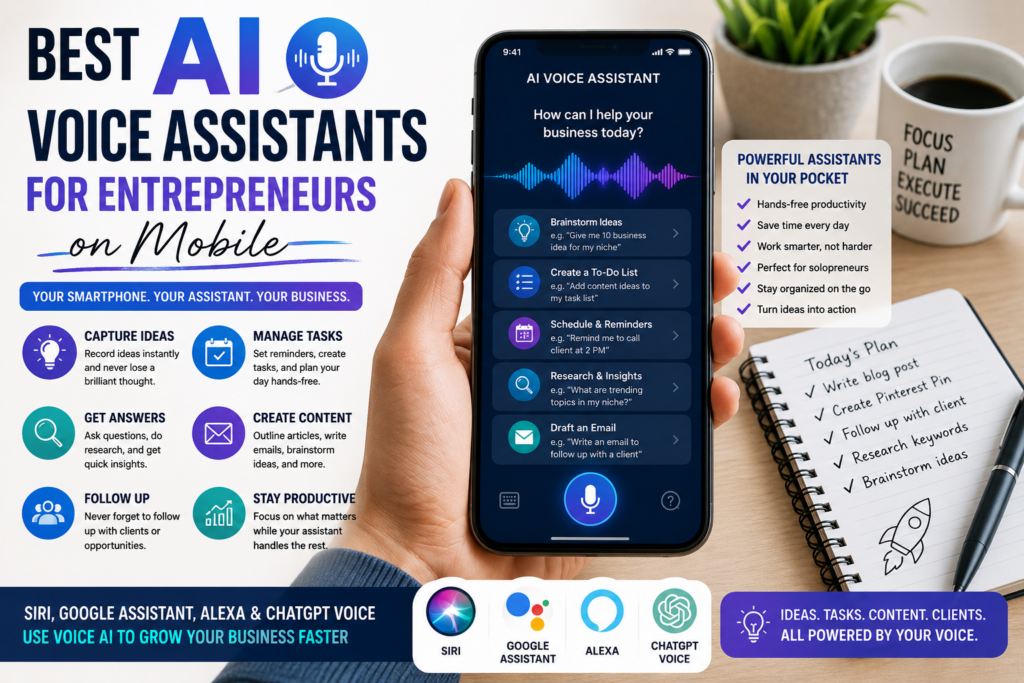
A smartphone can be more than a phone.
For an entrepreneur, it can become a notebook, calendar, research tool, content planner, reminder system, email assistant, business coach, idea recorder, and daily command center.
But most people still use their phone in a very basic way.
They type messages.
They check social media.
They answer calls.
They scroll.
They maybe write a few notes.
The real opportunity is using voice.
When you combine your smartphone with AI voice assistants, you can capture ideas faster, organize tasks, plan your day, draft content, research questions, prepare meetings, and manage small business activities while you are walking, driving, cooking, working, or taking a short break.
That makes AI voice assistants especially useful for solopreneurs and beginner entrepreneurs.
You do not always have time to sit behind a laptop. You may be building your business between work shifts, family responsibilities, travel, or daily life.
Your phone is already with you.
The question is:
Can your phone become your business assistant?
The answer is yes, if you use the right voice tools in the right way.
Affiliate disclosure: This post contains affiliate links. If you make a purchase through one of these links, ProBusinessStrategy may earn a small commission at no extra cost to you. We only recommend tools we genuinely believe in.
What Is an AI Voice Assistant for Entrepreneurs?
An AI voice assistant is a tool you can speak to instead of typing.
Some assistants are built into your phone, such as Siri on iPhone or Google Assistant on Android. Others are AI chat apps with voice features, such as ChatGPT voice mode. Alexa can also help with reminders, lists, routines, calendar-related productivity, and smart home or office-style organization. Apple describes Siri as a voice-based assistant for calls, texts, apps, and everyday tasks, while Google Assistant’s app listing describes hands-free help for calls, texts, emails, reminders, lists, questions, directions, and device control. OpenAI describes ChatGPT voice mode as a way to talk with ChatGPT for brainstorming, quick answers, and hands-free conversations.
For entrepreneurs, the value is not only convenience.
The value is speed.
Instead of stopping everything to type, you can say:
“Remind me to follow up with that client tomorrow.”
“Create a list of content ideas for my next blog post.”
“Summarize this business idea into three steps.”
“Help me brainstorm names for a digital product.”
“Add website update to my task list.”
“What should I research before starting this business?”
“Draft a short email to a potential customer.”
“Give me five questions to ask before hiring a freelancer.”
Voice turns your phone into a faster thinking tool.
Why Entrepreneurs Should Use Voice Assistants
Entrepreneurs have too many open loops.
Ideas appear at random moments. Tasks pile up. Small reminders disappear. Opportunities get forgotten. Follow-ups are delayed. Content ideas come and go before they are written down.
Voice assistants help because they reduce friction.
If you need to unlock your phone, open an app, type a note, correct mistakes, and organize the note, you may not do it.
But if you can speak the idea immediately, you are more likely to capture it.
That is especially useful for:
Business ideas
Content ideas
Client follow-ups
Meeting reminders
Shopping lists for supplies
Quick research questions
Email drafts
Task lists
Marketing ideas
Video scripts
Blog outlines
Daily planning
Competitor observations
Voice notes after calls
The more you capture, the less you lose.
That alone can improve how you run your business.
The Best AI Voice Assistants for Mobile Entrepreneurs
There is no single perfect assistant for every entrepreneur.
The best choice depends on your phone, workflow, business type, and what you want to do.
Some tools are better for simple commands.
Some are better for deep thinking.
Some are better for reminders and routines.
Some are better for brainstorming and content.
A smart entrepreneur can use more than one.
1. ChatGPT Voice: Best for Business Thinking and Brainstorming
ChatGPT voice is one of the most useful options for entrepreneurs because it works more like a conversation partner than a simple command tool.
You can use it to think through business ideas, outline articles, plan offers, prepare questions, create content drafts, summarize decisions, and talk through problems. OpenAI’s voice mode page describes using voice for instant answers, brainstorming ideas, and hands-free conversations, with transcripts available so you can review the conversation later.
This makes it especially powerful for solopreneurs.
You can use it when you are not ready to write.
For example, you can say:
“I have an idea for a website about wedding dress inspiration. Help me turn it into a business model.”
Or:
“I want to start a phone-based business. Ask me questions to narrow down the best idea.”
Or:
“Turn this rough thought into a blog post outline.”
ChatGPT voice is strong because it can help you reason through an idea.
It is not only setting a reminder.
It is helping you think.
Best Uses for ChatGPT Voice
ChatGPT voice is especially useful for:
Business idea brainstorming
Article outlines
YouTube video scripts
TikTok script ideas
Pinterest pin descriptions
Market research questions
Offer creation
Customer persona development
Email drafts
Product ideas
Digital product planning
Problem-solving conversations
Daily business planning
For example, if you are walking outside and suddenly think of a new article idea, you can open voice mode and talk it through.
By the time you are done, you may have:
A title
An outline
A few key points
A possible affiliate angle
A Pinterest description
A first draft direction
That is much faster than trying to remember the idea later.
Weakness of ChatGPT Voice
ChatGPT voice is not always the best tool for basic phone control.
If you want to call someone, set a quick phone alarm, open an app, or start navigation, your built-in phone assistant may be faster.
ChatGPT is strongest when you want thinking, planning, writing, or brainstorming.
So use it as a business conversation partner.
Use your phone assistant for device commands.
2. Siri: Best for iPhone Productivity and Quick Capture
If you use an iPhone, Siri can be useful for quick actions.
Siri is built into the Apple ecosystem, so it can help with voice commands, calls, texts, reminders, directions, and app-related tasks. Apple also describes Siri as a way to simplify and accelerate everyday tasks on iPhone, especially with newer Apple Intelligence features on supported devices.
For entrepreneurs, Siri is useful when speed matters.
You can say:
“Remind me to send the invoice at 9 AM.”
“Add buy printer paper to my business list.”
“Text John that I will call him later.”
“Set a timer for 25 minutes.”
“Create a calendar event for client call tomorrow.”
“Open Notes.”
“Call my supplier.”
This may sound basic, but basic tasks are where many entrepreneurs lose time.
If you use Siri well, you can reduce small friction during the day.
Best Uses for Siri
Siri is good for:
Reminders
Timers
Calls
Messages
Calendar items
Opening apps
Quick notes
Hands-free navigation
Simple task capture
Apple ecosystem workflows
For an iPhone-based entrepreneur, Siri works best as a fast command assistant.
It may not be the best for deep business strategy, but it can help keep your day organized.
Weakness of Siri
Siri is not always the strongest option for long brainstorming sessions or complex business planning.
For deeper thinking, you may prefer ChatGPT voice.
A smart workflow is:
Use Siri to capture tasks quickly.
Use ChatGPT voice to think through ideas deeply.
That combination can work very well.
3. Google Assistant and Gemini: Best for Android Users and Google Workflows
Google Assistant is useful for Android users because it connects well with Google services and phone actions.
The Google Assistant app listing describes using voice to control the phone, open apps, make calls, send texts, manage emails, set reminders, create lists, ask questions, find directions, and control smart home devices. It also notes that users can opt in to Gemini as the primary assistant from Google on the phone.
For entrepreneurs who use Gmail, Google Calendar, Google Maps, Google Docs, Google Tasks, or Android, this can be practical.
You can use it for:
Quick reminders
Calendar planning
Directions to meetings
Voice searches
Business questions
Sending messages
Opening productivity apps
Creating lists
Managing basic tasks
For a mobile entrepreneur, Google Assistant can become the everyday operations assistant.
Best Uses for Google Assistant
Google Assistant is good for:
Android phone control
Google Calendar support
Gmail-related workflows
Google Maps and directions
Quick search questions
Reminders and tasks
Opening apps
Voice commands
Hands-free productivity
If your business runs through Google tools, this can be useful.
For example, if you use Google Calendar for client calls and Google Keep for notes, the assistant can help you move faster through your day.
Weakness of Google Assistant
Like Siri, Google Assistant is often better for commands than deep strategy.
It can answer questions and help with tasks, but for detailed business thinking, brainstorming, article planning, or offer creation, ChatGPT voice may be stronger.
Use Google Assistant for operating the phone.
Use ChatGPT for thinking through business ideas.
4. Alexa: Best for Home Office Routines and Lists
Alexa may not be the first tool people think of for mobile business, but it can still be useful for entrepreneurs who work from home or use Echo devices.
Amazon’s Alexa productivity pages describe using Alexa for reminders, alarms, to-do lists, calendars, and work-style routines.
This makes Alexa useful for home office organization.
For example:
“Alexa, remind me to check orders at 4 PM.”
“Alexa, add printer ink to my office list.”
“Alexa, set a 30-minute focus timer.”
“Alexa, remind me to publish my Pinterest Pin.”
“Alexa, add website backup to my task list.”
Alexa can help reduce mental clutter, especially if you are often moving around the house.
Best Uses for Alexa
Alexa is good for:
Home office reminders
Timers
Shopping lists
To-do lists
Calendar routines
Focus sessions
Simple productivity habits
Voice control in the workspace
If you work from a desk, kitchen table, or home office, Alexa can act like a background productivity assistant.
Weakness of Alexa
Alexa is not the best choice for detailed business writing or strategic planning.
It is stronger for routines, lists, reminders, and simple workflow support.
For deeper business work, pair it with ChatGPT or another AI chat tool.
5. Voice Typing: The Most Underrated Mobile Business Tool
Not every voice tool needs to be an assistant.
Sometimes the most useful tool is simple voice typing.
Instead of typing a blog idea, email draft, product description, or content outline, you can dictate it.
This works well for entrepreneurs because speaking is often faster than typing on a phone.
You can dictate:
Blog post ideas
Email drafts
Client notes
Sales page ideas
Product descriptions
Video scripts
Meeting summaries
Daily plans
Content captions
Business journal entries
The rough draft does not need to be perfect.
The goal is to capture thoughts quickly.
Later, you can clean it up with AI.
For example:
Speak your idea into a note.
Paste it into ChatGPT.
Ask it to organize the text into an article outline, email, script, or checklist.
That workflow is simple and powerful.
Best Business Tasks for AI Voice Assistants
AI voice assistants are most useful when you connect them to real business tasks.
Here are practical examples.
Capturing Business Ideas
Ideas often appear when you are not ready to write.
Use voice to capture them immediately.
Say:
“Create a note called business idea: AI wedding dress style finder.”
Or open ChatGPT voice and say:
“I just had a business idea. Ask me questions and help me shape it.”
This prevents ideas from disappearing.
Planning Your Day
A voice assistant can help you plan your day before you start working.
Example prompt:
“Help me plan a simple business work session. I have two hours. I need to write one article, create a Pinterest Pin, and update internal links.”
This turns vague work into a plan.
Creating Content Outlines
If you publish blog posts, YouTube scripts, TikToks, or Pinterest content, voice can speed up planning.
Example:
“Create a blog outline for an article about using AI voice assistants for entrepreneurs on mobile.”
Or:
“Give me seven Instagram carousel slides from this article idea.”
This is where ChatGPT voice becomes especially useful.
Managing Follow-Ups
Many business opportunities are lost because people forget to follow up.
Use voice reminders.
Examples:
“Remind me tomorrow morning to email the client.”
“Add follow up with logo designer to my task list.”
“Remind me Friday to check affiliate application status.”
Simple reminders can protect revenue.
Researching Quickly
You can use voice to ask quick research questions.
Examples:
“What should I check before choosing an affiliate program?”
“What questions should I ask before hiring a freelancer?”
“What are common problems with digital product businesses?”
“What should I research before starting a local service business?”
This gives you a starting point.
You should still verify important details, especially when money, law, finance, or current platform rules are involved.
Writing First Drafts
Voice can help you create messy first drafts.
You can speak naturally:
“I want to write an article about service versus product versus digital product. The main idea is that beginners should not start with the hardest model. They should start with what helps them learn fastest…”
Then use AI to organize it.
This is a strong mobile workflow because it removes the blank page problem.
Creating Checklists
Entrepreneurs need checklists.
Voice assistants can help create them quickly.
Examples:
“Create a checklist for launching a digital product.”
“Create a checklist for researching competitors.”
“Create a checklist for publishing a blog post.”
“Create a checklist for setting up a simple website.”
Checklists are useful because they turn business ideas into action.
How to Build a Mobile Voice Workflow
To get real value, create a system.
Do not use voice randomly.
Use it as part of your business routine.
Morning: Plan the Day
Ask your assistant:
“What are the three most important business tasks I should complete today?”
Or:
“Help me plan a 90-minute content work session.”
This gives the day direction.
During the Day: Capture Ideas
Use voice whenever an idea appears.
Capture:
Article titles
Business ideas
Customer problems
Affiliate product ideas
Social media hooks
Questions to research
Tasks to complete
Do not judge ideas too early.
Capture first. Sort later.
Afternoon: Process Notes
At the end of the day, review voice notes and AI conversations.
Turn them into:
Tasks
Article outlines
Email drafts
Research questions
Product ideas
Social media posts
This prevents your notes from becoming a graveyard.
Evening: Set Reminders
Use your assistant to prepare tomorrow.
Examples:
“Remind me at 9 AM to finish the article.”
“Remind me to create the Pinterest Pin after publishing.”
“Add internal links review to my task list.”
This keeps the business moving.
The Best Assistant Combination for Entrepreneurs
The best setup is not one tool.
It is a combination.
For iPhone Users
Use:
Siri for reminders, calls, messages, app control, calendar, timers
ChatGPT voice for business ideas, planning, writing, brainstorming, strategy
This gives you speed and intelligence.
For Android Users
Use:
Google Assistant or Gemini for phone control, Google tools, reminders, search, directions
ChatGPT voice for business thinking, content, planning, and strategy
This gives you a strong mobile workflow.
For Home Office Entrepreneurs
Use:
Alexa for routines, timers, lists, and home office reminders
ChatGPT voice for deeper business work
Siri or Google Assistant for phone-specific tasks
This is useful if you move between phone and home workspace.
When to Outsource After Using Voice AI
Voice assistants can help you organize your business tasks, but they cannot do everything.
At some point, you may need help with design, editing, research, branding, website setup, or content formatting.
For example, you might use ChatGPT voice to brainstorm a business idea, then hire someone on Fiverr to create a logo, edit a video, design Pinterest templates, or format a digital product.
You can use AI voice to define the task more clearly before outsourcing.
That makes hiring easier.
Instead of saying, “I need help with my brand,” you can prepare a clear brief:
Business name
Audience
Style
Colors
Deliverables
Examples
Deadline
Budget
A better brief usually produces better results.
Turning Voice Ideas Into a Website
Many entrepreneurs use voice assistants to capture ideas but never turn them into assets.
A better approach is to publish your best ideas.
For example, if you use voice AI to brainstorm a business idea, you can turn that idea into:
A blog post
A checklist
A Pinterest Pin
A YouTube Short
A digital product
A lead magnet
An affiliate article
A service offer
If you want to build a content business from your phone, you need a website as your home base. A domain from Namecheap and hosting from Bluehost can give your ideas a permanent place to live.
If you want a faster website setup, WordPress AI Sitebuilder can help create a starting point.
The voice assistant helps you think.
The website helps you publish.
Common Mistakes to Avoid
Mistake 1: Expecting One Assistant to Do Everything
Siri, Google Assistant, Alexa, and ChatGPT voice are not the same.
Use each for its strength.
Commands and reminders are different from deep business planning.
Mistake 2: Not Reviewing Voice Notes
Capturing ideas is not enough.
You need a review habit.
Once per day, check your notes and turn useful ideas into action.
Mistake 3: Asking Vague Questions
Weak prompt:
“Help me with business.”
Better prompt:
“I have 60 minutes and want to create a blog outline for a phone-based business idea. Ask me questions and help me structure it.”
Specific questions produce better answers.
Mistake 4: Using Voice Only for Reminders
Reminders are useful, but voice assistants can do much more.
Use them for brainstorming, planning, drafting, research questions, decision-making, and content creation.
Mistake 5: Trusting AI Without Checking Important Facts
AI can help you think, but you still need judgment.
For legal, financial, medical, tax, platform rules, pricing, affiliate terms, and current business information, verify with reliable sources before making decisions.
Best Voice Prompts for Mobile Entrepreneurs
Here are practical prompts you can use.
“Help me turn this rough business idea into a simple offer.”
“Ask me five questions to clarify my target audience.”
“Create a blog outline from this idea.”
“Turn this thought into a short TikTok script.”
“Create a checklist for launching this business idea.”
“Summarize the pros and cons of this offer.”
“Help me write a follow-up email to a potential client.”
“Give me ten Pinterest Pin title ideas for this article.”
“Turn this voice note into a clean action plan.”
“Help me decide what to work on first today.”
These prompts are simple, but they can save a lot of time.
Who Should Use AI Voice Assistants for Business?
This approach is useful for:
Solopreneurs
Bloggers
Affiliate marketers
Digital product creators
Freelancers
Local service business owners
YouTube creators
Pinterest marketers
TikTok creators
Consultants
Coaches
People building from their phone
People with many ideas but little structure
It is especially useful if you are busy.
Voice lets you build momentum in small moments.
That is powerful for beginners.
Getting Started This Week
Do not try to build a complicated system.
Start with one voice habit.
For the next seven days, use your phone to capture every business idea by voice.
Then at the end of each day, choose one idea and ask AI:
“What can I do with this?”
You may turn it into:
A task
A blog title
A product idea
A content outline
A customer question
A research topic
A social media post
A checklist
After one week, you will see the value.
Your phone will no longer feel like only a distraction device.
It becomes a business tool.
And when you combine voice capture, AI thinking, reminders, content planning, and a simple website, your smartphone can become something much more powerful:
A mobile command center for your business.
Internal Linking
Related Articles:
How to Use ChatGPT from Your Phone for Business
50 Businesses You Can Run from Your Phone
How to Create a YouTube Affiliate Channel from Your Smartphone



