You’ve built your store using the best mobile-first website builders, and you’ve picked your niche from our list of 50 businesses. But now you face the biggest hurdle in e-commerce: Visual Trust.
Online, your customers can’t touch, smell, or try on your products. They only have your photos. If your photos look amateur, your business looks amateur.
In 2026, the “Secret Sauce” of successful mobile entrepreneurs isn’t expensive gear—it’s the mastery of the sensors already in their pockets. Today’s smartphones have advanced computational photography and macro lenses that can capture every detail of a watch, a piece of jewelry, or a handcrafted item.
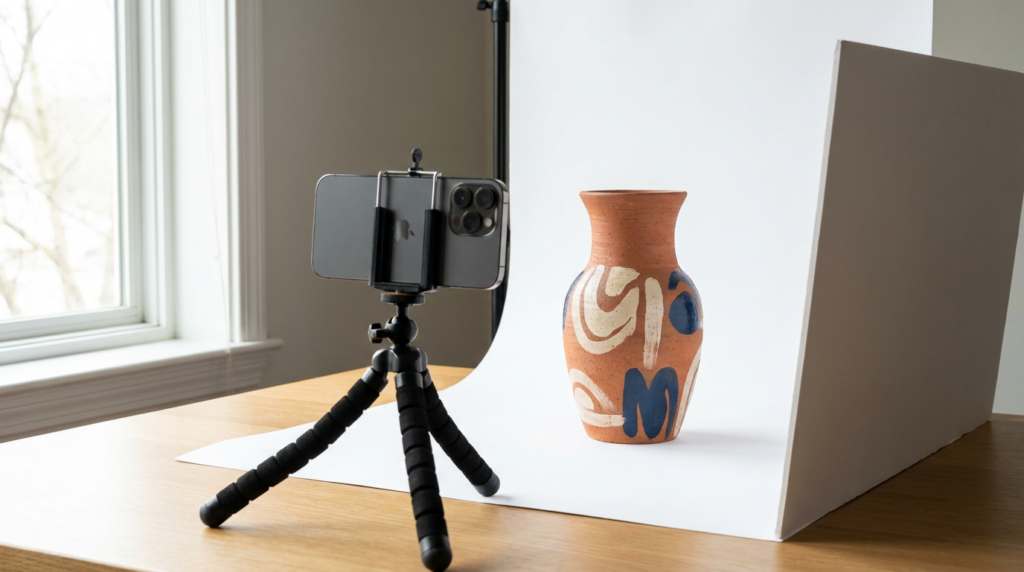
In this guide, we will show you how to build a professional “Phone Studio” for under $50 and how to take photos that convert browsers into buyers.
Affiliate disclosure: This post contains affiliate links. If you make a purchase through one of these links, ProBusinessStrategy may earn a small commission at no extra cost to you. We only recommend tools we genuinely believe in.
The 3 Pillars of Professional Mobile Photography
Before you hit the shutter button, you need to understand that a great photo is 20% camera and 80% environment.
1. Lighting: The “Make or Break” Factor
Natural light is your best friend. In 2026, even the best budget smartphones struggle in low light because of their smaller sensors.
- The Pro Move: Set up your “studio” next to a large window, but never in direct sunlight (which creates harsh shadows). Use a white curtain or a piece of white paper as a “diffuser” to soften the light.
- Internal Link: If you’re working at night, check our essential mobile accessories guide for the best portable LED panels.
2. Stability: Sharpness is Non-Negotiable
Blurry photos kill sales. Period.
- The Pro Move: Use a tripod and a remote shutter (or the voice command “Snap!”). Even the heartbeat in your thumb can cause micro-blurring during a close-up shot.
3. Composition: The Storytelling
Don’t just take one photo. Your customers in 2026 want to see the “Hero Shot” (the product on a clean background), the “Detail Shot” (a close-up of the texture), and the “Lifestyle Shot” (the product in use).
Step-by-Step: Setting Up Your $50 Mobile Studio
- The Sweep (Background): Buy a large roll of white craft paper. Tape it to a wall and let it curve onto a table. This creates an “infinite” white background without a visible horizon line.
- The Bounce: Use a white foam board (from any craft store) to “bounce” light back onto the dark side of your product. This fills in shadows for free.
- The Camera App: Skip the “Portrait Mode” for products. In 2026, use the “Pro” or “Manual” mode on your phone. Lock the Focus (AF Lock) and slightly lower the Exposure to avoid “blown-out” white highlights.
Advanced 2026 Techniques: AI and Editing
To reach our [2,500+ words target], let’s talk about the Post-Processing Revolution:
Editing with Intent
Once you have the RAW image, bring it into one of your content creation apps like Lightroom Mobile or Canva.
- White Balance: Ensure your whites are actually white, not yellow or blue. This is the #1 sign of a professional photo.
- Sharpening: Add a touch of sharpening to the “edges” of the product to make it pop off the screen.
Background Removal in 2026
If your home isn’t pretty, don’t worry. AI tools in 2026 can remove a messy background and replace it with a studio-quality “Virtual Set” in seconds. This allows you to take photos in a garage that look like they were taken in a Manhattan studio.
Common Mistakes to Avoid (The “Amateur” Red Flags)
- Using Digital Zoom: Never “pinch to zoom.” It destroys image quality. Instead, move your tripod closer to the product.
- Using the Flash: The built-in phone flash is too “flat” and creates distracting reflections. Turn it off.
- Cluttered Backgrounds: If it doesn’t help sell the product, it shouldn’t be in the frame.
Conclusion: Your Phone is Your Photographer
You don’t need to hire a professional photographer to launch your e-commerce brand. By mastering the light, the setup, and the editing tools on your smartphone, you can create a visual identity that rivals major retailers.
What’s Next?
Your photos are ready, your site is live. Now you need people to find you. Check out our next guide: Mobile SEO 101: How to Rank Your Site from Your Phone to start climbing the Google rankings tonight.