LinkedIn can feel intimidating when you are just starting a business.
You open the platform and see polished founders, corporate updates, big announcements, professional headshots, award posts, conference photos and people sharing business wins that sound far ahead of where you are right now.
Then you wonder:
What should I post?
Am I experienced enough to share advice?
Will people take me seriously?
Should I talk about my business idea?
Should I post personal stories?
Should I only share professional updates?
What if nobody reacts?
For many new entrepreneurs, LinkedIn becomes a platform they know they should use but keep avoiding.
That is a missed opportunity.
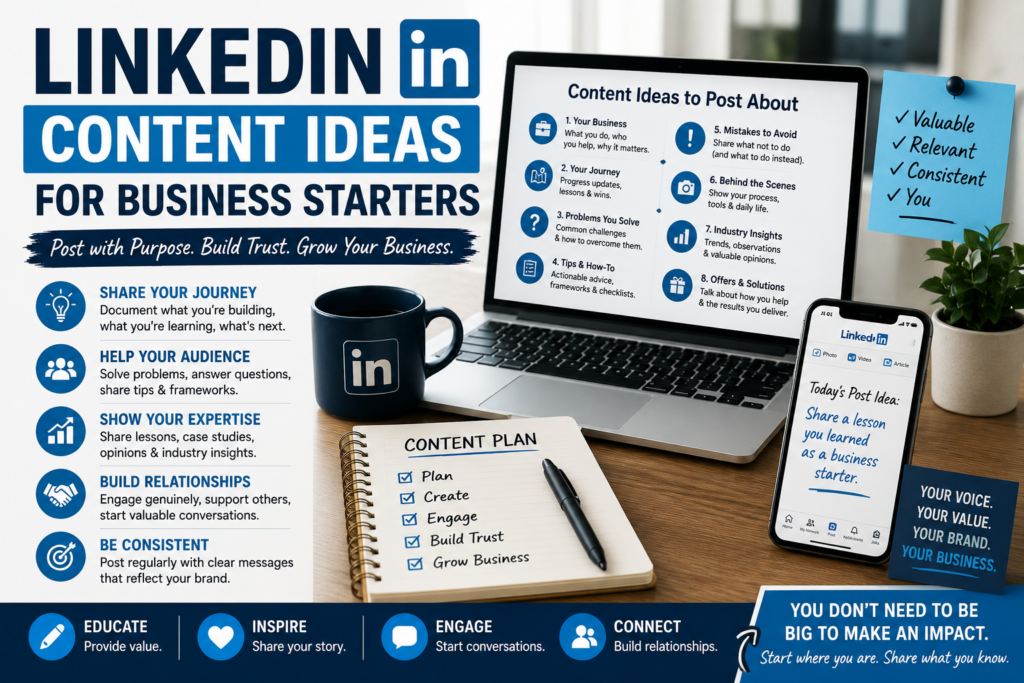
You do not need to be a famous founder to post on LinkedIn. You do not need a huge company, a perfect brand or years of authority. You can start by sharing what you are building, what you are learning and how you think about the problem your business solves.
The key is to stop treating LinkedIn like a stage where only experts are allowed to speak.
Treat it like a business journal, trust-building platform and professional content channel.
This guide gives you practical LinkedIn content ideas for business starters who want to build visibility in a simple, honest and strategic way.
Affiliate disclosure: This post contains affiliate links. If you make a purchase through one of these links, ProBusinessStrategy may earn a small commission at no extra cost to you. We only recommend tools we genuinely believe in.
Why Business Starters Should Use LinkedIn
LinkedIn is useful for business starters because the audience is already in a professional mindset.
People use LinkedIn to discover ideas, learn from others, follow industries, find opportunities, build relationships and understand what people are working on.
That makes it a strong platform for:
New entrepreneurs
Solopreneurs
Freelancers
Consultants
Coaches
Service providers
B2B businesses
Creators with business content
Startup founders
Side hustlers becoming serious
People building personal brands
You do not have to sell aggressively.
In fact, LinkedIn often works better when you build trust first.
A good LinkedIn presence can help you:
Explain what you do
Show your thinking
Share your progress
Build credibility
Attract potential clients
Meet collaborators
Get feedback
Stay visible in your network
Create future opportunities
Document your business journey
The earlier you start, the easier it becomes.
If you wait until everything is perfect, you miss the chance to let people see the process.
The Biggest LinkedIn Mistake New Entrepreneurs Make
The biggest mistake is thinking every post has to be impressive.
New business owners often believe they can only post when they have:
A big launch
A major client win
A revenue milestone
A finished website
A perfect offer
A polished brand
A strong testimonial
A complete business plan
But most business content does not need to be dramatic.
A useful post can be simple.
You can post about:
A lesson you learned
A mistake you noticed
A useful checklist
A question your audience asks
A problem you are solving
A small behind-the-scenes update
A decision you made
A common beginner mistake
A useful resource
A business idea you are testing
A client problem you understand
A personal reflection from the process
LinkedIn content works best when it feels useful, relevant and human.
You do not need to pretend to be bigger than you are.
You can share from the position you are actually in:
“I am building this.”
“I am learning this.”
“I noticed this.”
“I tested this.”
“I used to think this, but now I think that.”
“Here is what helped me.”
“Here is what I would do differently.”
That is enough to start.
Step 1: Define What You Want to Be Known For
Before creating LinkedIn posts, decide what you want people to associate with you.
This does not have to be complicated.
Ask yourself:
What business am I building?
Who do I want to help?
What problems do I understand?
What topics do I want to talk about repeatedly?
What kind of opportunities do I want LinkedIn to create?
What do I want people to remember about me?
For example:
A new freelance copywriter may want to be known for helping small businesses write clearer website copy.
A new consultant may want to be known for helping local businesses improve simple systems.
A new ecommerce founder may want to be known for testing niche product ideas.
A new coach may want to be known for helping beginners take practical first steps.
A new solopreneur may want to be known for building a one-person business without overcomplication.
Your content should support that direction.
If your business is about helping small businesses get customers, posting random productivity quotes every day will not build the right association.
Your posts should slowly teach people:
This is what I care about.
This is what I understand.
This is who I help.
This is how I think.
This is why I may be useful.
That is the foundation of LinkedIn content strategy.
Step 2: Choose Three Core Content Pillars
A simple LinkedIn content strategy can start with three pillars.
Content pillars are the main categories you post about.
For business starters, a good structure is:
- Your business topic
- Your building journey
- Your audience’s problems
Let’s break that down.
Pillar 1: Your Business Topic
This is the main area you want to be known for.
Examples:
Marketing
Client acquisition
Business systems
Freelancing
Ecommerce
Branding
Local business growth
Website design
AI tools
Productivity
Customer service
Business planning
Content strategy
If you are starting a business around website design, post about website mistakes, homepage clarity, conversion basics and examples of good website structure.
If you are starting a coaching business, post about the problems your ideal clients face.
Pillar 2: Your Building Journey
This is where you document what you are doing.
Examples:
What you are building
What you are testing
What you learned this week
What surprised you
What you changed
What you are working on next
What went wrong
What became clearer
This makes your content more personal and real.
Pillar 3: Your Audience’s Problems
This is where you speak directly to the people you want to help.
Examples:
Common mistakes
Questions they ask
Simple frameworks
Before-and-after thinking
Step-by-step advice
Decision guides
Checklists
Myths
Objections
Beginner lessons
This pillar is important because your content should not only be about you.
It should help the audience.
25 LinkedIn Content Ideas for Business Starters
Here are practical LinkedIn post ideas you can use when you are starting a business.
1. The “What I’m Building” Post
This is a simple introduction post.
Use it to explain what you are creating and who it is for.
Example angle:
“I’m building a simple service for small business owners who need clearer website copy without hiring a full agency.”
Structure:
What you are building
Who it helps
Why you are building it
What problem you noticed
What you are learning along the way
This kind of post helps your network understand your direction.
2. The “Why I Started” Post
People connect with reasons.
Explain why you decided to start this business.
You can write about:
A problem you noticed
A personal experience
A gap in the market
A repeated conversation
A frustration with existing solutions
A skill you wanted to use differently
A customer group you care about
Keep it honest and specific.
Avoid dramatic storytelling if it does not fit. A simple reason is enough.
3. The “Problem I Keep Seeing” Post
This is useful for showing expertise.
Start with:
“One problem I keep seeing with [audience] is…”
Examples:
“One problem I keep seeing with new freelancers is that they describe their service too broadly.”
“One problem I keep seeing with small business websites is that the homepage does not explain the offer quickly.”
“One problem I keep seeing with new ecommerce sellers is that the product description lists features but not benefits.”
Then explain why it matters and what to do instead.
4. The “Beginner Mistake” Post
Beginner mistake posts are easy to understand and often useful.
Examples:
“3 mistakes new business owners make when writing their first offer.”
“5 mistakes I made while trying to explain my service.”
“The biggest mistake I see in beginner LinkedIn profiles.”
Structure:
Name the mistake
Explain why it happens
Show the consequence
Offer a better approach
These posts are helpful because people like avoiding mistakes.
5. The “Before and After” Thinking Post
This post shows how your thinking has changed.
Use this format:
“I used to think [old belief]. Now I think [new belief].”
Examples:
“I used to think a business needed a perfect website before getting customers. Now I think a clear offer and direct conversations matter more at the beginning.”
“I used to think LinkedIn content had to sound professional. Now I think clear and useful beats polished and empty.”
This format works well because it feels human and educational.
6. The “Simple Framework” Post
LinkedIn users often like practical frameworks.
You can create a small model around your topic.
Examples:
“The 3-part offer clarity test”
“The 5-question homepage review”
“The simple first client checklist”
“The beginner content system”
“The trust-building post formula”
Structure:
Name the framework
Explain each step
Show how to use it
End with a simple takeaway
Frameworks make your thinking easier to remember.
7. The “What I Learned This Week” Post
This is perfect for business starters.
You do not need a huge achievement.
You can share a small lesson.
Examples:
“What I learned this week from talking to potential customers.”
“What I learned this week while rewriting my offer.”
“What I learned this week from posting on LinkedIn.”
“What I learned this week from building my first landing page.”
These posts document progress and create consistency.
8. The “Small Win” Post
Share small wins, not only big milestones.
Examples:
First discovery call
First reply from outreach
First testimonial
First product page published
First useful comment
First email subscriber
First offer clarified
First sale
First referral
First week of consistent posting
The key is to connect the win to a lesson.
Do not only say:
“I got my first client!”
Say what it taught you.
That makes the post more useful and less like bragging.
9. The “Question I Got” Post
If someone asks you a question, turn it into a post.
Examples:
“A friend asked me if they need a website before getting clients. Here is my answer.”
“A new founder asked how often they should post on LinkedIn. My honest answer: less often than they think, but more clearly.”
This works because real questions often reflect real audience problems.
10. The “Checklist” Post
Checklists are practical and easy to save.
Examples:
“Before you publish your first service page, check these 7 things.”
“Before you post on LinkedIn, ask yourself these 5 questions.”
“Before you send a proposal, make sure this is clear.”
Use short, direct points.
A checklist should be easy to scan.
11. The “Myth vs Reality” Post
This is good for challenging assumptions.
Examples:
Myth: You need a big audience before you can get clients.
Reality: You need the right conversations with the right people.
Myth: LinkedIn content has to be formal.
Reality: It has to be clear, useful and relevant.
Myth: A business starter should hide the messy process.
Reality: The process can build trust if shared thoughtfully.
This format is easy to read and often creates engagement.
12. The “One Thing I Would Do First” Post
This is strong for beginner education.
Examples:
“If I were starting a service business today, the first thing I would do is write one clear offer.”
“If I were starting on LinkedIn from zero, the first thing I would do is define three content pillars.”
“If I were launching a product, the first thing I would test is whether people understand the problem.”
This post format is simple and useful.
13. The “Behind the Scenes” Post
Show what you are working on.
Examples:
Drafting your offer
Creating a content calendar
Building a landing page
Researching customer problems
Preparing a product
Testing a new service
Rewriting your bio
Creating a simple lead magnet
Behind-the-scenes content makes your business feel real.
It does not have to be dramatic.
A simple screenshot, note or short explanation can work.
14. The “Tool or Resource” Post
Share a tool, template, book, article, method or workflow that helped you.
But do not just post the tool name.
Explain how you use it.
Examples:
“I started using a simple spreadsheet to track outreach. These are the columns that actually matter.”
“A notes app became my first content system. Here is how I use it.”
This shows practical thinking.
15. The “Customer Problem Breakdown” Post
Choose one problem your ideal customer has and break it down.
Example:
“Why new business owners struggle to explain what they sell.”
Then explain:
The surface problem
The deeper cause
Why it matters
What to fix first
This type of post builds authority because it shows you understand the audience.
16. The “Offer Clarity” Post
If you are building a business, talk about offers.
Examples:
“A clear offer should answer three questions: who is it for, what problem does it solve, and what result does it create?”
“New service providers often describe what they do, but not why it matters.”
Offer clarity content is useful for many entrepreneurs and service businesses.
17. The “Personal Lesson” Post
A personal lesson does not need to be emotional or dramatic.
It can be professional and practical.
Examples:
“I delayed posting on LinkedIn because I thought I needed more experience. The truth: writing helped me clarify my thinking faster.”
“I used to hide early-stage business work. Now I see that documenting the process helps people understand the direction.”
These posts help people connect with you.
18. The “Common Objection” Post
Address an objection your audience may have.
Examples:
“I do not have time to post on LinkedIn.”
“I do not know what to say.”
“I am not an expert yet.”
“I do not want to sound salesy.”
“I am afraid people will judge my business idea.”
Then respond with practical advice.
This is helpful because objections often stop people from taking action.
19. The “Mini Case Study” Post
Even if you do not have many clients yet, you can share small examples.
Examples:
How you improved your own profile
How you rewrote your offer
How you tested a product idea
How you organized your content system
How you helped a friend clarify an idea
How one conversation changed your positioning
A mini case study should include:
Starting point
What changed
Result
Lesson
Keep it honest.
Do not exaggerate.
20. The “Content Repurposing” Post
Show how one idea can become multiple posts.
Example:
“One customer question can become: a LinkedIn post, a short video, a FAQ, a newsletter topic and a sales page section.”
This is especially useful for business starters who feel like they never have enough content ideas.
21. The “Industry Observation” Post
Share what you notice in your niche.
Examples:
“I see many new consultants overcomplicate their websites before they have validated their offer.”
“More small businesses are using AI, but many still need help turning ideas into clear customer-facing content.”
An observation post shows that you are paying attention.
22. The “Contrarian but Useful” Post
This does not mean being controversial just to get attention.
It means sharing a thoughtful opinion that challenges common advice.
Examples:
“You do not need to post every day on LinkedIn if every post is unclear.”
“Your first business website does not need to impress everyone. It needs to help the right person understand your offer.”
“Being consistent does not mean repeating generic advice.”
These posts can stand out if they are grounded and useful.
23. The “Ask for Input” Post
LinkedIn can be used for feedback.
Examples:
“I’m working on a guide for new business owners. What is one topic you wish someone explained earlier?”
“I’m testing two ways to describe my offer. Which one is clearer?”
This can create engagement and help you learn.
But use it genuinely.
Do not ask fake engagement questions.
24. The “Founder Journal” Post
A founder journal post shares progress in a simple format.
Example:
“Founder journal: this week I worked on three things…”
Then list:
What you worked on
What you learned
What you are changing next
This is useful for documenting the journey without pretending everything is perfect.
25. The “Useful Reminder” Post
Simple reminders can work well when they are specific.
Examples:
“Your first offer does not need to be perfect. It needs to be clear enough for one real conversation.”
“Your LinkedIn content does not have to impress everyone. It has to help the right people understand how you think.”
“Do not wait until your business looks established to start sharing useful ideas.”
These posts are short, but they can still be valuable.
A Simple Weekly LinkedIn Content Plan
Here is a beginner-friendly weekly plan.
Monday: Problem Post
Talk about one problem your audience has.
Example:
“One reason new business owners struggle with LinkedIn is that they try to sound impressive instead of clear.”
Tuesday: Lesson Post
Share something you learned while building your business.
Example:
“What I learned from rewriting my offer this week.”
Wednesday: Practical Tip Post
Give a checklist, framework or step-by-step idea.
Example:
“Before posting on LinkedIn, check: who is this for, what problem does it address, what should the reader do next?”
Thursday: Journey Post
Share a behind-the-scenes update.
Example:
“I am testing two versions of my service offer. Here is what I changed and why.”
Friday: Soft Promotion Post
Mention what you do, who you help or what you are building.
Example:
“I help new business owners turn unclear ideas into simple offers and content they can actually use.”
This plan gives structure without making your content robotic.
You can start with three posts per week if five feels too much.
How to Write a Strong LinkedIn Post
A good LinkedIn post usually has three parts:
Hook
Body
Takeaway
The hook gets attention.
Examples:
“Most new business owners do not have a content problem. They have a clarity problem.”
“I used to think LinkedIn was only useful after you had a business. I now think it helps you build one.”
The body explains the idea.
Use short paragraphs.
The takeaway gives the reader something useful.
Examples:
“So before you write your next post, ask: what do I want to be known for?”
“Your early content does not need to be perfect. It needs to make your thinking visible.”
Avoid giant walls of text.
LinkedIn users scan.
Make posts easy to read.
What Business Starters Should Not Post
Not every post helps your brand.
Avoid:
Fake success stories
Exaggerated revenue claims
Constant selling
Generic motivation with no substance
Copying popular creators word for word
Posting only quotes
Complaining without insight
Overly vague personal branding language
Content that has nothing to do with your direction
Posts designed only to trigger engagement
You do not need to sound corporate.
You also do not need to overshare.
The best beginner LinkedIn content is useful, honest and connected to your business direction.
How LinkedIn Content Can Support a New Business
LinkedIn content can support your business in several ways.
It can help people understand what you do.
It can help you practice explaining your offer.
It can bring conversations from your network.
It can attract people with similar interests.
It can show potential customers how you think.
It can create trust before a sales conversation.
It can help you test messages.
It can turn repeated questions into content.
It can support your website, newsletter, service or product.
This is why business starters should not ignore LinkedIn.
Even a small audience can be valuable if the right people are paying attention.
You are not only posting for likes.
You are building a professional content trail.
Final Thoughts
LinkedIn content does not have to be complicated for business starters.
You do not need to act like a big founder.
You do not need to post dramatic stories.
You do not need to pretend you have everything figured out.
You can start with simple, useful content.
Share what you are building.
Explain what you are learning.
Talk about the problems your audience has.
Post practical frameworks.
Document the journey.
Ask better questions.
Share small wins.
Offer useful reminders.
Make your thinking visible.
Over time, this creates trust.
And trust is one of the most useful assets a new business can build.
The goal is not to become the loudest person on LinkedIn.
The goal is to become clear, consistent and useful enough that the right people start to understand what you do.
That is how LinkedIn content can help a business starter grow.
One post at a time.