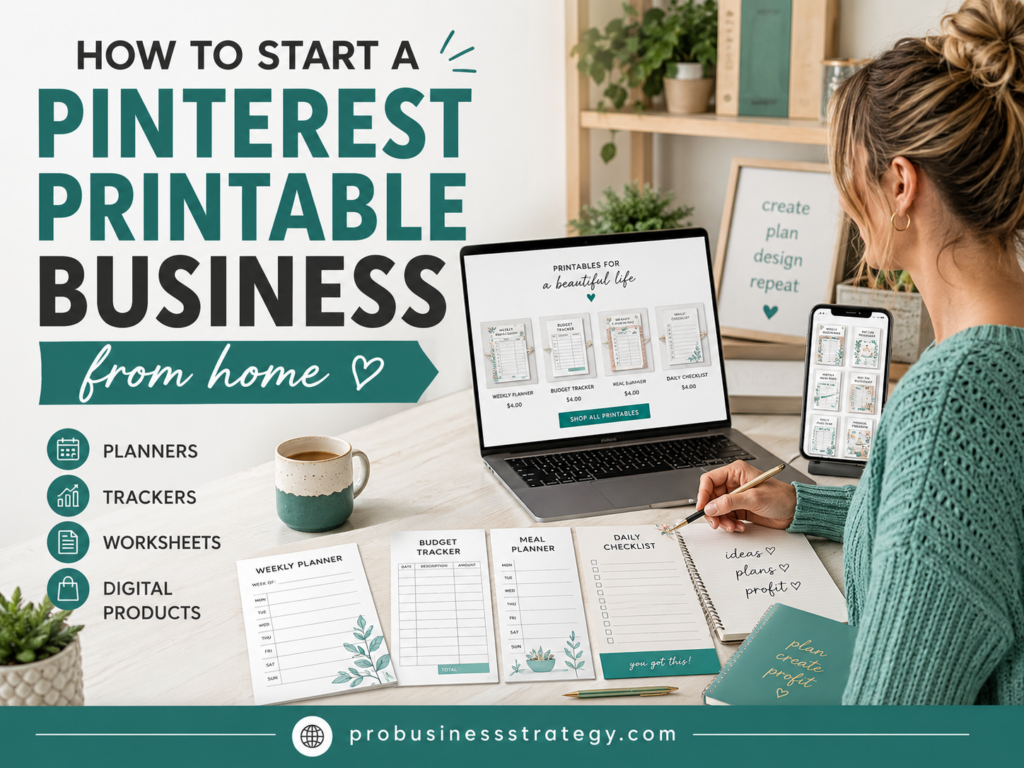
A Pinterest printable business is one of the simplest digital product ideas you can start from home.
You do not need inventory.
You do not need shipping boxes.
You do not need a warehouse.
You do not need to create a complicated software product.
You do not even need to be on camera.
You create a useful printable, upload it as a digital product and use Pinterest to attract people who are already searching for ideas, planners, worksheets, trackers and templates.
That is what makes this business model interesting.
Pinterest is not just a social media platform. It is also a visual search engine. People use it to discover solutions, save ideas and plan future actions. That makes it a strong platform for printable products.
Someone might search for:
Meal planner printable
Budget tracker
Wedding checklist
Cleaning schedule
Habit tracker
Business planner
Kids activity worksheets
Daily planner template
Goal setting worksheet
Social media content calendar
If your printable helps with a specific problem, Pinterest can become a traffic source for your product.
This guide will show you how to start a Pinterest printable business from home in a simple, practical way.
Affiliate disclosure: This post contains affiliate links. If you make a purchase through one of these links, ProBusinessStrategy may earn a small commission at no extra cost to you. We only recommend tools we genuinely believe in.
What Is a Pinterest Printable Business?
A Pinterest printable business is a small digital product business where you create downloadable files and promote them through Pinterest.
The customer buys the printable, downloads the file and prints it at home or uses it digitally, depending on the format.
Common printable products include:
Planners
Checklists
Trackers
Worksheets
Calendars
Templates
Wall art
Kids activities
Budget sheets
Meal plans
Wedding planners
Business worksheets
Goal-setting pages
Content calendars
Cleaning schedules
Study planners
Fitness trackers
The printable can be a one-page product or a larger bundle.
For example, you could sell:
A one-page weekly meal planner
A 10-page budget planner
A 30-page wedding planning workbook
A printable habit tracker bundle
A small business startup checklist
A homeschool worksheet pack
A social media content planning kit
The key is that the product should help someone do something more easily.
A printable business is not about making random pretty pages.
It is about creating useful tools people want to save, download and use.
Why Pinterest Works Well for Printables
Pinterest works especially well for printables because the platform is built around visual discovery.
People go to Pinterest to plan.
They plan weddings.
They plan meals.
They plan home organization.
They plan businesses.
They plan content.
They plan parties.
They plan budgets.
They plan routines.
They plan personal goals.
That planning mindset is perfect for printables.
A printable is often a tool that helps someone organize a plan.
For example:
A bride saves wedding checklist Pins.
A parent saves kids activity worksheets.
A student saves study planner templates.
A small business owner saves content calendar ideas.
A freelancer saves invoice and client workflow checklists.
A homeowner saves cleaning schedule printables.
Pinterest users often think ahead. They save ideas before they need them.
That means a good Pin can continue working long after you publish it.
This is one reason Pinterest can be useful for digital products. A TikTok or Instagram post may disappear quickly in the feed, but a Pinterest Pin can keep bringing traffic over time if it is search-friendly and visually clear.
Step 1: Choose a Printable Niche
The first step is choosing a niche.
Do not start by trying to make printables for everyone.
A focused niche makes it easier to create products, write Pin descriptions, choose keywords and build a recognizable brand.
Possible printable niches include:
Budgeting printables
Wedding planning printables
Small business printables
Homeschool printables
Kids activity printables
Meal planning printables
Fitness trackers
Habit trackers
Cleaning schedules
Goal-setting worksheets
Teacher worksheets
Student planners
Content creator planners
Etsy seller printables
Self-care planners
Travel planning printables
Home organization printables
Party planning templates
A good niche has three qualities:
People search for it.
People have a problem to solve.
A printable can help solve that problem.
For example, “home organization” is broad. But “weekly cleaning schedule for busy moms” is more specific.
“Business printables” is broad. But “simple startup checklist for new solopreneurs” is more specific.
Specificity helps.
Pinterest users often search for practical phrases. A product with a clear use case is easier to promote than a vague printable with no obvious purpose.
Step 2: Find a Specific Problem to Solve
After choosing a niche, choose a problem.
This is where many printable businesses go wrong.
They create pretty templates without asking what the customer actually needs.
A better approach is to start with the problem.
Examples:
“I need to plan my meals for the week.”
“I need to track my monthly budget.”
“I need to organize my wedding tasks.”
“I need to plan my TikTok content.”
“I need a simple cleaning schedule.”
“I need worksheets for my child.”
“I need to track my habits.”
“I need to plan my small business launch.”
“I need a checklist before starting an online store.”
Every printable should have a job.
A meal planner helps someone plan meals.
A budget tracker helps someone manage money.
A content calendar helps someone plan posts.
A wedding checklist helps someone avoid forgetting tasks.
A business worksheet helps someone think through an idea.
When your printable solves a real problem, it becomes easier to sell.
The customer does not buy “a PDF.”
They buy clarity, organization, time saved, confidence or a simpler process.
Step 3: Choose Your First Printable Product
For your first product, keep it simple.
Do not start with a 100-page planner.
Start with something you can finish, publish and test.
Good first printable ideas include:
One-page checklist
Weekly planner
Monthly tracker
Simple worksheet
Mini planner pack
Content calendar
Goal planner
Budget tracker
Meal planner
Cleaning schedule
Habit tracker
Business idea worksheet
Startup checklist
Wedding task checklist
A small product is useful because you can learn the process without getting overwhelmed.
For example, instead of creating a huge “Complete Life Planner,” start with:
A weekly goal planner
A 30-day habit tracker
A simple monthly budget sheet
A printable meal planning page
A small business idea validation worksheet
Your first printable is not your final business.
It is your first test.
Once you understand what people click, save and buy, you can create better products and bundles.
Step 4: Design the Printable
You do not need to be a professional designer, but the printable should look clean and easy to use.
A printable should be:
Readable
Organized
Useful
Easy to print
Visually clear
Not too crowded
Consistent in style
Aligned with the niche
Simple design often works better than overdesigned pages.
If someone prints your worksheet at home, they need to be able to read it clearly. Avoid tiny text, too many decorative elements or low-contrast colors.
Useful printable design tips:
Use clear headings
Leave enough writing space
Keep sections organized
Use simple boxes and lines
Avoid clutter
Use consistent fonts
Make it printer-friendly
Offer both color and black-and-white versions if useful
Include instructions if needed
You can create printables with design tools, document editors or simple layout software. The tool matters less than the clarity of the product.
If you need help with design, formatting or product mockups, you can also use Fiverr to outsource small tasks.
But do not let design perfection stop you.
A useful printable with simple design is better than a beautiful printable that does not solve a real problem.
Step 5: Create a Product Mockup
Pinterest is visual, so your product needs a strong visual presentation.
A mockup shows what the printable looks like.
Instead of only showing a flat PDF screenshot, create images that help people imagine using the product.
Mockup ideas:
Printable page on a desk
Planner pages with a pen
Worksheet in a clipboard
Bundle preview with several pages
Laptop and printable preview
Tablet preview for digital use
Before-and-after organization scene
Printable pages stacked together
Product preview with labels
A good mockup makes the product feel more real.
For example, a “weekly meal planner” looks more appealing when shown next to a grocery list, notebook, coffee cup or kitchen background.
A “small business startup checklist” looks more useful when shown on a desk with business planning notes.
A “wedding planner printable” looks stronger with elegant styling and checklist previews.
The Pin should quickly communicate what the product is and why it matters.
Step 6: Decide Where to Sell Your Printables
You need a place where customers can buy or download your printables.
Options include:
Your own website
A Shopify store
A digital product platform
An Etsy-style marketplace
A Gumroad-style product page
A simple WordPress site
A landing page with checkout
If you want more control over your brand, website and customer journey, building your own site can be useful. You can use Namecheap for a domain name and Bluehost if you want to build a WordPress-based website.
If you prefer an ecommerce store setup, Shopify can also be used for selling digital products, depending on your product setup and app choices.
You do not need a complicated store at the beginning.
For your first test, you need:
A product title
A product description
Product images
A price
A download file
A simple checkout
A thank-you or delivery process
Keep the buying process simple.
If people click from Pinterest and land on a confusing page, they may leave.
Step 7: Write a Strong Product Description
Your product description should explain what the printable does and who it helps.
Do not only say:
“Printable planner PDF.”
Say what it helps the buyer do.
Example:
“This weekly meal planner helps busy families plan dinners, organize groceries and reduce last-minute food decisions. Print it each week and use it to map out meals, shopping needs and simple prep notes.”
That is much stronger.
Your product description should include:
What the printable is
Who it is for
What problem it solves
What pages are included
How the customer can use it
File format
Printing instructions
Important notes
Benefits
License or usage rules if needed
For example:
“Includes 5 printable PDF pages: weekly planner, monthly overview, habit tracker, goal worksheet and reflection page.”
Be clear.
Digital product buyers want to know exactly what they are getting.
Step 8: Create Pinterest-Friendly Pins
Pinterest Pins for printables should be clear, attractive and search-friendly.
A good Pin should show:
The product type
The main benefit
A preview of the printable
A strong headline
A clean design
A clear reason to click
Pin headline examples:
Printable Weekly Meal Planner
Simple Budget Tracker Printable
Wedding Planning Checklist PDF
Small Business Startup Checklist
30-Day Habit Tracker Printable
Printable Content Calendar for Creators
Home Cleaning Schedule Template
Goal Setting Worksheet for Beginners
Avoid overly vague headlines like:
“Get Organized Today”
That might sound nice, but it does not tell people what the printable is.
A better headline:
“Printable Weekly Cleaning Schedule”
That is searchable and clear.
Pinterest users often scan quickly. Your Pin should communicate the product in seconds.
Step 9: Use Pinterest Keywords
Pinterest search matters.
Your Pin title, Pin description, board names and product page should include relevant keywords naturally.
For example, if you sell a budget tracker printable, possible keywords may include:
Budget tracker printable
Monthly budget planner
Printable budget worksheet
Budget planner PDF
Finance tracker printable
Household budget template
Money saving planner
Do not stuff keywords in an unnatural way.
Use them clearly.
Example Pin description:
“Use this printable monthly budget tracker to organize income, expenses, savings goals and spending categories. A simple budget planner PDF for beginners who want a clearer money routine.”
That includes keywords while still sounding useful.
You can also create boards around your niche, such as:
Printable Planners
Budget Printables
Home Organization Printables
Small Business Templates
Wedding Planning Printables
Printable Worksheets
Digital Product Ideas
For a deeper Pinterest board strategy, you can also read:
How to Use Pinterest Boards to Sell Digital Tools
Step 10: Create Multiple Pins for One Product
Do not create only one Pin per product.
Create several Pins with different angles.
For example, for a weekly meal planner, you could create Pins like:
“Printable Weekly Meal Planner”
“Plan Your Meals in 10 Minutes”
“Meal Planning Printable for Busy Families”
“Simple Grocery List and Meal Planner PDF”
“Stop Wondering What to Cook Tonight”
“Weekly Dinner Planner Printable”
Each Pin can point to the same product but use a different headline, design or benefit.
This helps you test which message gets more attention.
Some people respond to the practical product name.
Others respond to the problem.
Others respond to the outcome.
Pinterest gives you room to test those angles.
Step 11: Build Product Bundles
Once you have several related printables, create bundles.
Bundles can increase perceived value.
Examples:
Meal planning bundle
Budget planner bundle
Wedding planning bundle
Small business startup bundle
Home organization bundle
Student planner bundle
Self-care tracker bundle
Kids activity bundle
Content creator planner bundle
A bundle can include several pages around one theme.
For example, a small business startup printable bundle could include:
Business idea worksheet
Niche selection worksheet
Offer planning