Customer service is one of the most important parts of a business.
It does not matter whether you run a blog, online store, freelance service, coaching business, affiliate site, digital product shop, local service business, or home-based business.
People will have questions.
They may ask about your product, your service, your price, your delivery time, your process, your availability, your refund policy, your next step, or how something works.
If you respond slowly, unclearly, or inconsistently, you may lose trust.
But if you respond quickly, clearly, and professionally, customer service can become a business advantage.
The good news is that you do not need a large support team to start.
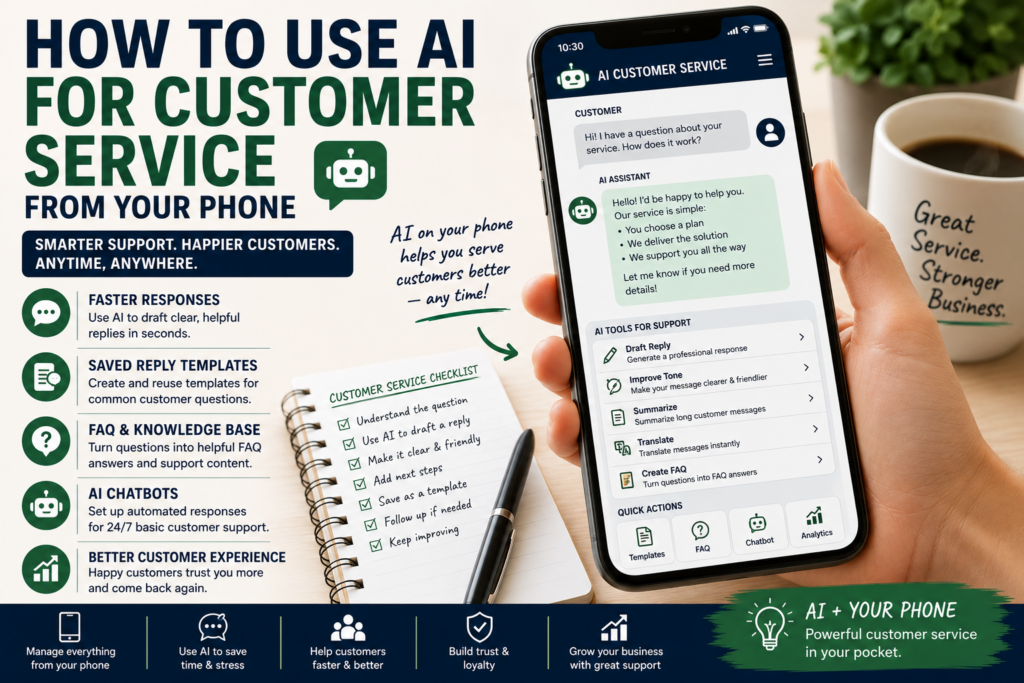
With AI and a smartphone, you can handle many customer service tasks faster and better.
You can write better replies, organize common questions, create response templates, summarize conversations, prepare FAQ answers, and even use chatbot or automated response tools to help customers when you are not available.
This article explains how to use AI for customer service from your phone.
Affiliate disclosure: This post contains affiliate links. If you make a purchase through one of these links, ProBusinessStrategy may earn a small commission at no extra cost to you. We only recommend tools we genuinely believe in.
Why Customer Service Matters
Many beginners think customer service only matters after they have many customers.
That is a mistake.
Customer service starts the moment someone asks a question.
A potential customer may ask:
“How does this work?”
“Do you offer this service?”
“How much does it cost?”
“Can I get help with this?”
“Where can I download it?”
“How fast can you deliver?”
“What happens after I order?”
“Do you have an example?”
“How do I start?”
These questions are opportunities.
A good answer can move someone closer to buying, booking, subscribing, or trusting your business.
A weak answer can make them disappear.
Customer service is not only problem-solving.
It is also trust-building.
Your Phone Can Become a Customer Service Desk
Your smartphone can already do a lot.
You can answer emails, respond to social messages, reply to comments, manage chat apps, check orders, read reviews, update FAQs, send invoices, and communicate with customers.
AI makes this more powerful.
Instead of writing every reply from zero, you can use AI to help you:
Draft professional responses
Rewrite messages in a better tone
Summarize long customer conversations
Create FAQ answers
Build saved reply templates
Translate basic support messages
Organize complaints
Create troubleshooting steps
Prepare refund or follow-up messages
Turn repeated questions into website content
This can save time and reduce stress.
It can also help you sound more professional, especially when you are busy, tired, or unsure how to phrase something.
What AI Customer Service Means
AI customer service does not always mean a complicated chatbot.
It can be much simpler.
AI customer service can mean:
Using AI to write better replies
Using AI to create templates
Using AI to summarize customer problems
Using AI to organize common questions
Using AI to draft FAQ pages
Using AI to help with chatbot scripts
Using AI to suggest next steps
Using AI to improve tone and clarity
For small businesses, this is often enough.
You do not need a fully automated support system on day one.
You can start by using AI as a support assistant from your phone.
Start With Common Questions
The best place to begin is with repeated questions.
Look at your emails, messages, comments, DMs, contact form submissions, and customer conversations.
Write down the questions people ask more than once.
For example:
How do I start?
How much does it cost?
What do I get?
How long does it take?
Can I use this from my phone?
Do you offer refunds?
Can this work for beginners?
What tool do I need?
What is the next step?
These questions are valuable.
They show what your audience does not understand yet.
You can use AI to turn them into:
Saved replies
FAQ sections
Website copy
Social media posts
Email responses
Chatbot answers
Product instructions
Customer onboarding messages
A repeated question is not annoying.
It is a signal.
It tells you what your business needs to explain better.
Step 1: Create Saved Reply Templates
Saved replies are one of the easiest ways to use AI for customer service.
A saved reply is a pre-written answer you can reuse.
For example, if people often ask about your service process, you can create a clear response once and reuse it.
Prompt AI like this:
“Write a friendly and professional customer service reply explaining how my service works in three simple steps.”
Or:
“Create a short support response for a customer asking how to get started. Keep it clear, warm, and professional.”
You can create templates for:
New customer questions
Pricing questions
Delivery questions
Refund questions
Technical issues
Order updates
Appointment confirmations
Follow-ups
Thank-you messages
Complaint replies
This saves time and keeps your communication consistent.
Step 2: Improve Your Tone
Sometimes the hardest part of customer service is tone.
You may know what you want to say, but not how to say it professionally.
AI can help rewrite your message.
For example, you can write a rough answer and ask:
“Rewrite this message to sound polite, clear, and professional.”
Or:
“Make this response friendlier without sounding too casual.”
Or:
“Make this reply shorter and easier for a customer to understand.”
This is useful when replying from your phone because typing long messages on a small screen can be frustrating.
AI can help you turn a rough message into something better.
Step 3: Summarize Customer Problems
Some customers send long messages.
They explain the problem, add details, mention previous attempts, and ask several questions at once.
From your phone, this can feel overwhelming.
AI can help summarize.
You can paste the message and ask:
“Summarize this customer issue in simple points and suggest what I should answer first.”
Or:
“List the customer’s main questions and organize them in order.”
This helps you respond more clearly.
Instead of missing details, you can answer the most important points one by one.
Step 4: Create FAQ Answers
An FAQ page can reduce repeated questions.
If people keep asking the same things, your website should answer them.
AI can help turn customer questions into FAQ answers.
For example:
“Turn these customer questions into a simple FAQ section for my website.”
Or:
“Write beginner-friendly FAQ answers for these support questions.”
Good FAQ topics include:
How it works
Pricing
Delivery time
Refund policy
What is included
Who it is for
How to contact support
Common problems
Technical requirements
Next steps
A strong FAQ saves time because customers can find answers before contacting you.
It also makes your business look more organized.
Step 5: Use AI for Social Media Customer Questions
Many businesses get questions through social media.
People may comment under posts, send DMs, or ask quick questions after watching a video.
AI can help you reply without sounding rushed.
Examples:
A person asks: “Can beginners do this?”
AI can help you write:
“Yes, this can work for beginners if you start with a simple version first. The key is to focus on one clear problem, one audience, and one small next step.”
A person asks: “Do I need expensive tools?”
AI can help you write:
“No, not at the beginning. Start with basic tools, test the idea, and only upgrade when you know the business direction is worth building.”
This kind of response is useful, clear, and not too long.
Step 6: Use AI to Build a Simple Chatbot Script
If your business grows, you may want automated customer support.
A chatbot can help answer basic questions when you are not available.
But a chatbot is only useful if the answers are good.
AI can help you create the script.
Start with questions like:
What do visitors usually ask?
What should the chatbot answer first?
When should it send someone to a human?
What links should it provide?
What should it not answer?
A simple chatbot script might include:
Welcome message
Main menu
Pricing question
Service explanation
Booking link
FAQ link
Contact form
Support email
Escalation to human support
Do not automate everything.
Use automation for simple questions.
For serious complaints, payment issues, legal questions, private information, or complex problems, a human should review the conversation.
Step 7: Create Customer Onboarding Messages
Customer service is not only about answering questions.
It is also about guiding new customers.
AI can help you create onboarding messages.
For example:
Welcome email
What happens next message
Order confirmation text
Service preparation checklist
First appointment instructions
Delivery timeline
Follow-up message
Review request
Support information
A good onboarding message reduces confusion.
It tells the customer what to expect.
For example:
“Thank you for your order. Here is what happens next: first, I will review your details. Then I will prepare the first version. You will receive an update within 48 hours. If I need extra information, I will contact you by email.”
That is simple, but professional.
Step 8: Handle Complaints More Carefully
AI can help with complaint responses, but you must be careful.
Complaints need empathy, clarity, and responsibility.
Do not let AI send automatic complaint replies without review.
Use AI to draft, not to decide.
A useful prompt:
“Write a calm and professional response to this customer complaint. Acknowledge the issue, ask for any missing details, and offer a clear next step. Do not admit legal liability.”
This can help you avoid emotional responses.
But always read the message carefully before sending.
For sensitive issues, ask a qualified professional if needed.
Step 9: Turn Customer Questions Into Content
Customer questions can become content ideas.
If one person asks something, others may have the same question.
You can use AI to turn questions into:
Blog posts
FAQ sections
Social media posts
Short videos
Email newsletters
Product instructions
Tutorials
Lead magnets
For example, if customers often ask:
“How do I know which business idea is right for me?”
That could become an article, checklist, video, or downloadable worksheet.
Customer service can become content research.
This is especially useful for a website like ProBusinessStrategy.
Questions reveal what beginners need explained.
Step 10: Keep Human Control
AI can help you respond faster.
But customer service should still feel human.
Do not blindly copy AI replies.
Before sending, check:
Is it accurate?
Is it polite?
Does it answer the real question?
Is it too long?
Is it too vague?
Is it too formal?
Does it match your business tone?
Does it promise something you cannot deliver?
Does it need a human decision?
AI should help you communicate better.
It should not make your business sound robotic.
What You Should Not Automate
Some things should not be fully automated.
Be careful with:
Refund decisions
Legal issues
Tax questions
Medical or financial advice
Private customer data
Angry complaints
Payment problems
Contract disputes
Sensitive personal information
Complex technical problems
AI can help you organize and draft, but a human should review these situations.
Trust matters.
Customers want speed, but they also want care.
AI Customer Service From Your Phone: Simple Workflow
Here is a simple daily workflow.
Open your customer messages.
Identify which messages are simple and which need more attention.
For simple messages, use saved replies.
For longer messages, ask AI to summarize.
For difficult replies, ask AI to draft a professional answer.
Edit the reply yourself.
Send it.
Save repeated questions.
Turn repeated questions into FAQ answers or templates.
This workflow can be done from your smartphone.
It does not require a full office setup.
Helpful Tools and Support
You can start with a simple AI assistant and your normal communication apps.
But if your customer service grows, you may need extra help.
You may need:
Chatbot setup
FAQ writing
Help desk organization
Email templates
Customer service scripts
Website support pages
Automation workflows
Virtual assistant support
If you do not want to build everything yourself, Fiverr can be useful for finding freelancers who offer chatbot setup, customer service scripts, FAQ writing, virtual assistant support, help desk setup, and website support page creation.
If your customer service depends on your website, it may also be important to have a reliable website foundation. For beginners building or improving a simple website, Bluehost or WordPress Website Builder can fit naturally.
The most important thing is to choose tools based on the real customer problem, not because a tool sounds impressive.
Business Ideas Around AI Customer Service
This topic can also become a business idea.
Many small business owners do not have time to create proper support systems.
You could offer a simple service such as:
AI-assisted FAQ creation
Customer service response templates
Chatbot script writing
Support page setup
Email reply templates
Customer onboarding message setup
Help desk organization
Social media DM response templates
This can be useful for small businesses, coaches, freelancers, local service providers, digital product sellers, and online stores.
For example, you could offer:
“Customer Service Starter Kit for Small Businesses”
It might include:
10 saved replies
FAQ section
Welcome message
Complaint response template
Follow-up message
Chatbot script outline
Customer onboarding checklist
This is not advanced customer support technology.
It is practical communication support.
And many small businesses need exactly that.
Common Mistakes to Avoid
Avoid these mistakes:
Using AI replies without checking them
Sounding too robotic
Automating sensitive issues
Ignoring repeated questions
Not saving useful templates
Making replies too long
Promising too much
Using unclear refund or policy language
Not updating your FAQ
Letting customers wait too long
The goal is not just speed.
The goal is helpful speed.
A fast bad answer is still a bad answer.
Final Thoughts
AI can make customer service from your phone much easier.
You can answer questions faster, create better replies, summarize conversations, build FAQs, prepare templates, and support customers more professionally.
But AI should not replace care.
Use it to help you think, write, organize, and respond.
Keep human judgment in the process.
Start small.
Create saved replies for common questions.
Use AI to improve tone and clarity.
Build an FAQ from repeated questions.
Create onboarding messages.
Then, if needed, add automation or chatbot tools later.
Your phone can become a simple customer service desk.
AI can become your support assistant.
Together, they can help you serve customers better, even when you are running the business alone.
Internal Linking
Related Articles:
How to Use ChatGPT From Your Phone for Business
50 Businesses You Can Start From Your Phone
How to Create a YouTube Affiliate Channel From Your Smartphone



