Digital Planners: How to Start a Profitable Digital Product Business in 2026 (From Your Phone)
Digital planners are one of the best “start small, scale fast” e-commerce ideas in 2026.
Why? Because you’re selling organization and clarity, not paper. The product is delivered instantly, margins are high, and you can build the entire business from your phone—design, storefront, marketing, customer support, and updates.
In this guide, you’ll learn exactly how to build a digital planner business the right way: what to create, which tools to use, how to price it, and how to get your first sales without needing a warehouse, a laptop lifestyle fantasy, or a huge audience.
Affiliate disclosure: This guide may contain affiliate links. If you purchase through them, ProBusinessStrategy may earn a commission at no extra cost to you. We only recommend tools we believe are genuinely useful for beginners and serious builders.
1) What is a digital planner (and why it still works in 2026)?
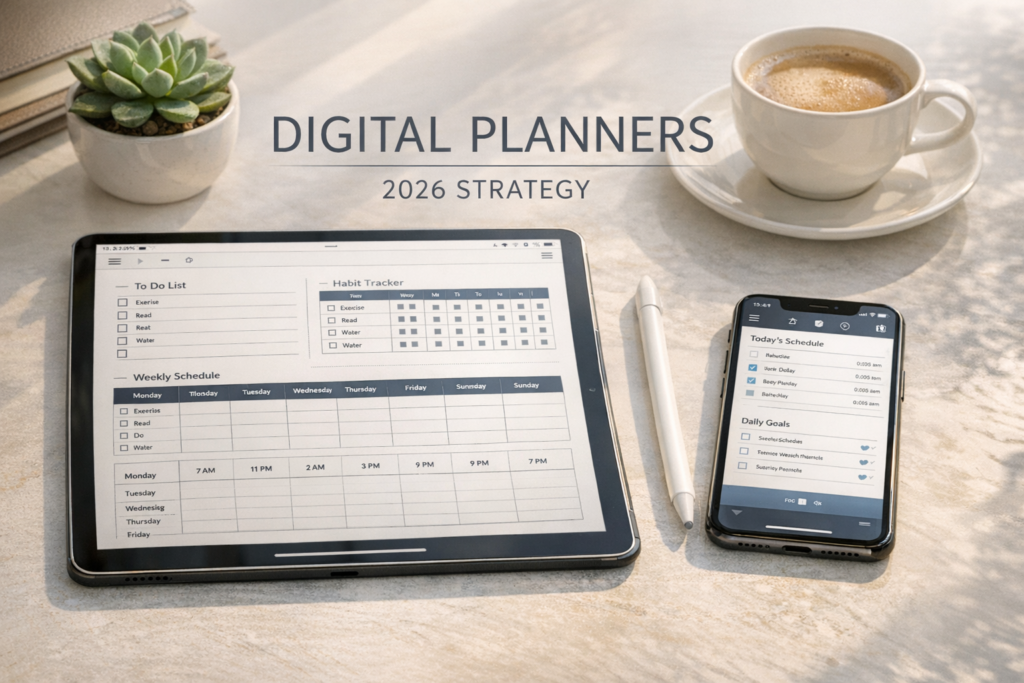
A digital planner is a downloadable planning system—usually used on an iPad/tablet or phone—built for apps like GoodNotes, Notability, or note-taking systems like Notion.
It works because it sits at the intersection of:
- Lifestyle demand (people want structure)
- Self-improvement trends (habits, productivity, journaling)
- Remote work reality (everyone plans digitally now)
- Instant gratification (download → start today)
Unlike physical products, you’re not competing on shipping speed or supplier quality. You win on:
- design taste,
- clarity,
- usability,
- and who your planner is made for.
If you want the big-picture view of the best models, start at your hub: Start an E-commerce Business.
2) The business model (how you actually make money)
There are three main ways to monetize digital planners:
A) One-time downloads (simple & beginner-friendly)
- Price: typically low-to-mid
- You sell volume and bundles
- Great for Etsy and Pinterest traffic
B) Bundles (higher average order value)
Instead of selling “one planner”, sell:
- Planner + habit tracker + meal planner + budget tracker
- A “full system” for one audience (e.g., students, moms, freelancers)
C) Ongoing updates / memberships (advanced)
- Monthly releases (templates, seasonal resets)
- Private community, accountability
- Best if you later build an email list
If you want to combine content + digital products later, Idea #35 on your hub (“Hybrid Affiliate Store”) is a strong long-term direction: Hybrid Affiliate Store.
3) Pick a niche (the fastest way to avoid price wars)
Most beginners fail because they create a planner “for everyone”. That forces you to compete on price and aesthetics only.
Instead, build a planner for a specific person with a specific life.
High-demand niche angles in 2026:
- Students (exam planning, assignment tracker)
- ADHD-friendly planning (short pages, minimal overwhelm)
- Fitness / wellness (training + meal + habit)
- Busy parents (family calendar + chores + routines)
- Freelancers (clients, invoices, content calendar)
- Entrepreneurs (weekly planning + KPIs + marketing tracker)
- Wedding planning (timeline, budget, vendors)
- Travel planning (itineraries, packing lists, budgets)
Pro rule: if your planner can be described as “made for this kind of person”, you’re on the right track.
4) Choose your format: GoodNotes-style PDF vs Notion vs printable
You can sell planners in different ecosystems. Choose one first.
Option 1: PDF Digital Planner (GoodNotes / Notability)
Pros
- Works on iPad + tablet
- Etsy buyers understand it
- Easy to package and deliver
Cons
- Must be designed carefully to be tappable/useful
Best for: aesthetic planners, daily/weekly templates, journaling systems.
Option 2: Notion dashboard planner
Pros
- Very powerful
- Customers love “systems”
- Great for higher price points
Cons
- Needs clearer onboarding and support
If you go this route, Idea #05 is literally “Notion Dashboards”: Notion Dashboards.
Option 3: Printable planner (print at home)
Pros
- Simple files
- Broad audience
Cons
- Lower perceived value
- Harder to stand out
A strong strategy is to offer both:
- printable pages and
- a digital GoodNotes version as a bundle.
5) Tools you need (phone-first, but professional)
You don’t need expensive software. You need a clean workflow.
Design tools (pick one primary)
- Canva (fast, beginner-friendly): see Canva Templates
- Procreate / Affinity (more advanced design control)
- Notion (for dashboards/templates)
File delivery
- Gumroad, Payhip, Etsy digital downloads, Shopify digital products
Organization & operations
- A simple system for tasks + versions (Notion works well): Notion Dashboards
- A checklist of what you ship (pages, covers, instructions, mockups)
Marketing content creation
If you want your product visuals to look premium, learn mobile product photography basics here: How to Take Professional Product Photos with Your Phone.
And if you want to keep costs low early on, this helps: Best Free Tools for Entrepreneurs in 2026.
6) What to include in a planner that sells
A digital planner sells when it’s not “pretty pages” but a clear outcome.
High-converting planner sections:
- yearly goals + quarterly review
- monthly calendar + habit tracker
- weekly planning spread (simple + consistent)
- daily pages (time blocks + top 3 priorities)
- budget page (if relevant)
- meal plan / grocery list (if lifestyle niche)
- project tracker (for students/freelancers)
- “reset” pages (weekly review, monthly reset)
Important: fewer pages can sell better if it reduces overwhelm. “Minimal ADHD planner” can outperform a 700-page mega-planner.
7) Pricing: realistic numbers (and how to raise prices)
A beginner mistake is pricing too low because “it’s just a PDF”.
Your customer isn’t paying for the file. They’re paying for:
- saved time,
- clarity,
- consistency,
- a system they can reuse.
Pricing structure that works:
- Single planner: entry-level price
- Bundle: mid price, best conversion
- “Ultimate system”: premium
Also: add value without adding complexity:
- bonus pages
- seasonal sets
- matching phone wallpapers
- onboarding guide (very underrated)
8) Where to sell: Etsy vs Gumroad vs Shopify
Etsy (fastest path to first sale)
Pros
- built-in buyer intent
- digital downloads are common
- great for keyword-driven search
Cons
- fees
- competition
- you don’t own the audience
Gumroad (simple storefront, great for creators)
Pros
- easy setup
- delivers files cleanly
- upsells and coupons are easy
Cons
- less built-in search traffic than Etsy
Shopify (best long-term brand move)
Pros
- full control
- email capture + brand building
- upsells, bundles, analytics
Cons
- more setup
- you must drive your own traffic
If you’re building broader e-commerce skills, your model guide is here: The Ultimate Dropshipping Guide 2026 (and yes—some of these model guides are currently shorter; we can upgrade them after the idea library is filled).
9) How to market digital planners (without a big following)
You only need one channel to start. Pick the one you can be consistent with.
A) Pinterest (best long-term for planners)
Pinterest is basically a visual search engine. Planner content fits perfectly:
- “weekly planner template”
- “student digital planner”
- “minimal habit tracker”
Make pins that show:
- before/after organization
- clean mockups
- “what’s inside” slides
- niche-specific benefits
B) Short-form video (TikTok/Instagram Reels)
What works:
- “plan with me”
- screen recordings of pages
- aesthetic desk shots + overlays
- quick tips + CTA to product
C) SEO content (highest quality traffic)
Blog posts that match search intent:
- “Best digital planners for students”
- “GoodNotes planner vs Notion”
- “How to use a digital planner (beginner guide)”
If you like this route, Idea #29 is perfect: Niche Buying Guides.
10) Product mockups: make it look premium (even from your phone)
Mockups sell the feeling. Your customer wants to imagine using it.
Simple mockup approach:
- Use Canva mockups
- Use iPad/phone frames
- Show 5–10 screenshots: cover, weekly, daily, tracker, bonus pages
Bonus: include a short “How to import” page inside the download. It cuts refunds and support tickets.
11) Customer support (the hidden reason digital sellers quit)
Digital products sound “passive”, until you get:
- “How do I open this?”
- “It doesn’t work on Android”
- “I bought this but I wanted a printable”
Solve it up front:
- Add a “Before you buy” section: compatible apps/devices
- Add onboarding instructions
- Add FAQ at the bottom of your sales page
This is also why building solid systems matters. If you want to run everything from your phone cleanly, your broader workflow mindset is covered on your hub: Start an E-commerce Business.
12) A simple 7-day launch plan (beginner-friendly, realistic)
Day 1: Choose niche + outcome
Pick one audience and one promise (“weekly clarity for busy moms”).
Day 2: Build the core pages
Create the weekly + daily + monthly pages.
Day 3: Add bonuses + instructions
Make onboarding, add 10 bonus pages.
Day 4: Mockups + product listing
Write the description, add screenshots, optimize keywords.
Day 5: Publish + test delivery
Buy your own product. Confirm everything works.
Day 6: Create 10 pins or 5 short videos
Schedule them. Don’t overthink.
Day 7: First promotion push
Post the story: why you made it, who it’s for, what problem it solves.
13) Common mistakes to avoid
- Creating for “everyone”
- Making it too complex (more pages ≠ more sales)
- Not stating compatibility (refund magnet)
- No mockups/screenshots
- No email capture (long-term growth limiter)
14) FAQs (copy-friendly for the bottom of your post)
Do I need an iPad to start this business?
No. You can design and sell from your phone. Many buyers will use iPads, but you can operate the business phone-first.
Is Etsy too competitive?
It’s competitive, but niche positioning + strong mockups + keyword alignment still wins.
Can I sell the same planner on multiple platforms?
Usually yes, but check platform rules and be consistent with your licensing terms.
How do I protect my planner from copying?
You can’t fully prevent it, but you can reduce issues by branding, building audience trust, and adding value via updates and bonuses.
Conclusion: Why Digital Planners are a top-tier 2026 idea
Digital planners are one of the cleanest ways to start an e-commerce business:
- no inventory
- no shipping
- high margins
- scalable
- perfect for phone-first entrepreneurs
If you want a structured, step-by-step path beyond this idea, go back to the master guide and grab the checklist: Start an E-commerce Business.