Choosing a business bank account sounds simple.
You open an account.
You receive payments.
You pay expenses.
You keep business money separate from personal money.
But once you start comparing business bank accounts, you quickly discover that not all accounts are the same.
Some have monthly fees.
Some have transaction limits.
Some are better for cash deposits.
Some are built for online businesses.
Some connect easily with bookkeeping tools.
Some offer cards, subaccounts, invoicing or payment features.
Some are simple but limited.
Some are powerful but expensive.
The “best” business bank account is not the same for every business.
A freelance writer does not need the same banking setup as a restaurant.
A home-based consultant does not need the same tools as a retail shop.
An ecommerce store does not need the same features as a local cleaning company.
A growing agency does not need the same setup as someone just starting a side business.
That is why this guide is not about naming one perfect bank.
It is about understanding what to look for.
When you know what matters, you can choose a business bank account and financial tools that fit your business instead of being impressed by features you may never use.
This guide explains what new business owners should compare before choosing a business bank account and the tools around it.
Affiliate disclosure: This post contains affiliate links. If you make a purchase through one of these links, ProBusinessStrategy may earn a small commission at no extra cost to you. We only recommend tools we genuinely believe in.
Why a Business Bank Account Matters
A business bank account helps separate your business money from your personal money.
That separation is important because it makes your finances easier to understand.
With a separate business account, you can more clearly track:
Business income
Business expenses
Client payments
Product sales
Software subscriptions
Tax-related payments
Supplier costs
Refunds
Cash flow
Profitability
If all business and personal transactions are mixed together, bookkeeping becomes messy.
You may forget which expenses were business-related.
You may struggle to calculate profit.
You may make tax preparation harder.
You may look less professional to clients.
You may have difficulty understanding whether the business is actually making money.
A business bank account is not only a place to store money.
It is part of your financial system.
Even a very small business can benefit from having a clean money setup early.
Business Bank Account vs Personal Account
Many beginners wonder if they can simply use a personal bank account for business.
In some cases, very small sole proprietors may start informally, but it is usually better to separate business finances as soon as possible.
A business account can help with:
Professional payments
Clear bookkeeping
Business expense tracking
Customer trust
Payment processing
Tax organization
Future loan applications
Business credibility
Financial reporting
Cleaner separation between personal and business activity
A personal account is designed for personal spending.
A business account is designed for business activity.
That difference becomes more important as the business grows.
If you plan to invoice clients, sell products, accept payments, pay contractors, track expenses or build a long-term business, a dedicated business account is usually the smarter foundation.
The Best Business Bank Account Depends on Your Business Model
Before comparing banks, think about how your business actually works.
Ask:
Do you receive payments online or in person?
Do you accept cash?
Do you send invoices?
Do you need a debit card?
Do you need employee cards later?
Do you need international payments?
Do you need multiple currencies?
Do you need bookkeeping integrations?
Do you want savings tools?
Do you need subaccounts for taxes or expenses?
Do you need payment links?
Do you want mobile-first banking?
Do you need a local branch?
Will you apply for financing later?
Your business model should guide the decision.
For example, a local food business may need strong cash deposit options.
An online consultant may care more about low fees, invoicing and bookkeeping integrations.
An ecommerce seller may need payment processor compatibility, chargeback handling, card controls and clean transaction exports.
A freelancer may need a simple account with low fees, invoice tracking and tax savings buckets.
There is no universal best account.
There is only the best account for your current business needs.
Step 1: Compare Monthly Fees
The first thing to check is the monthly fee.
Some business bank accounts charge a fixed monthly maintenance fee. Others offer no monthly fee, sometimes with fewer features or specific conditions.
A monthly fee is not always bad.
A paid account may be worth it if it gives you:
Better support
More transactions
Cash deposit options
Invoicing tools
Bookkeeping integrations
Multiple user access
Higher limits
Business savings features
Better reporting
More professional tools
But many new business owners do not need a complex paid account at the beginning.
Ask:
Is there a monthly fee?
Can the fee be waived?
What balance is required to waive it?
Does the account provide enough value for the fee?
Will the fee matter if revenue is still low?
Are there cheaper alternatives with the same core features?
For a new business, keeping fixed costs low can be helpful.
A €10, $15 or £20 monthly fee may not sound huge, but every recurring cost matters when the business is not yet stable.
Step 2: Look at Transaction Fees and Limits
Some business bank accounts include a certain number of free transactions per month.
After that, extra transactions may cost money.
This matters if your business has many small payments.
For example:
Ecommerce orders
Marketplace sales
Subscription payments
Client invoices
Supplier payments
Contractor payments
Refunds
Transfers
Card transactions
A business with 10 transactions per month has different needs than a business with 500 transactions per month.
Check:
How many free transactions are included?
What counts as a transaction?
What is the fee after the limit?
Are electronic transfers included?
Are debit card transactions included?
Are incoming payments included?
Are deposits included?
Are international transfers extra?
Do not only compare the monthly fee.
A low monthly fee can become expensive if transaction costs are high.
Step 3: Check Minimum Balance Requirements
Some banks require a minimum opening deposit or minimum ongoing balance.
If your balance drops below a certain amount, you may pay fees.
For a new business, this can matter.
Cash flow may be irregular at the beginning.
One month you may receive payments.
The next month may be quiet.
You may need to pay software, taxes, supplies or contractors before new money arrives.
A high minimum balance can create pressure.
Ask:
Is there a minimum opening deposit?
Is there a minimum daily or monthly balance?
What happens if the balance drops below the minimum?
Is the fee reasonable?
Does the account still make sense for a new business?
For beginners, flexibility is often more useful than prestige.
A simple account with no difficult balance requirement may be better than a premium account that creates unnecessary pressure.
Step 4: Review Payment Options
A business bank account should make it easy to receive and send money.
Look at the payment options.
Depending on your country and business model, this may include:
Bank transfers
Direct debit
Card payments
Payment links
Wire transfers
ACH or local equivalents
SEPA transfers in Europe
Mobile payments
Check deposits
Cash deposits
International payments
Marketplace payouts
Payment processor deposits
If you sell online, make sure your account works well with your payment processors.
If you invoice clients, check whether payments arrive easily and clearly.
If you work internationally, check fees and exchange rates.
If you handle cash, check where and how you can deposit it.
The right account should match the way money enters and leaves your business.
Step 5: Consider Bookkeeping Integrations
A good business bank account should help your bookkeeping, not make it harder.
Look for integrations with accounting or bookkeeping tools.
Useful features include:
Automatic transaction imports
Clean bank feeds
Expense categories
Receipt uploads
Export to CSV
Integration with bookkeeping software
Invoice matching
Tax reporting support
Payment reconciliation
Clear transaction descriptions
This matters because bookkeeping is one of the first admin problems many business owners face.
If your bank does not connect well with your bookkeeping system, you may spend more time manually entering transactions.
That can create mistakes.
A good banking setup should make financial admin easier.
Ask:
Can this account connect to my bookkeeping tool?
Can I export transactions easily?
Are transaction descriptions clear?
Can I upload receipts?
Can I separate expenses by category?
Can my bookkeeper or accountant access reports?
Your future self will appreciate clean records.
Step 6: Look for Subaccounts or Money Buckets
Some business banking tools allow you to create subaccounts, savings spaces or money buckets.
These can be very useful.
You can separate money for:
Taxes
Profit
Owner pay
Operating expenses
Emergency fund
Software subscriptions
Inventory
Marketing
Payroll
Equipment
Future investment
This helps you avoid one big confusing balance.
For example, if your account shows $5,000, that does not mean all $5,000 is available to spend.
Some may need to be reserved for taxes.
Some may be needed for upcoming bills.
Some may belong in your profit reserve.
Some may be needed for inventory.
Subaccounts make cash planning easier.
If your bank does not offer this feature, you can still track it manually in a spreadsheet.
But built-in money buckets can make the system easier to maintain.
Step 7: Check Debit Cards and Spending Controls
Many business accounts include a debit card.
For some businesses, that is enough.
Other businesses may need extra card features.
Look for:
Physical debit card
Virtual cards
Employee cards
Spending limits
Category restrictions
Card freezing
Merchant controls
Receipt capture
Separate cards for subscriptions
Notifications for card spending
Virtual cards can be useful for online subscriptions.
For example, you might use one card for software tools and another for advertising.
If a card is compromised, you can freeze it without disrupting every business payment.
Spending controls become more important as your business grows or when more people can make purchases.
At the beginning, you may only need one simple card.
But it is helpful to know what the account can support later.
Step 8: Review Security Features
Security matters because business bank accounts can be targets for fraud.
Look for:
Two-factor authentication
Strong login protection
Account alerts
Card freezing
Transaction notifications
User permissions
Secure app access
Fraud monitoring
Device management
Payment approval controls
Limits on transfers
Support for suspicious activity
A good business bank account should make it easier to notice unusual activity quickly.
Also think about your own habits.
Use strong passwords.
Do not reuse passwords.
Enable two-factor authentication.
Avoid public Wi-Fi for banking.
Be careful with email payment requests.
Verify supplier bank details.
Watch for invoice fraud.
Limit who has access to financial tools.
Security is not only about the bank.
It is also about your business processes.
A simple rule:
Treat your business bank account like a critical business asset.
Because it is one.
Step 9: Compare Customer Support
When banking works, nobody thinks about support.
When something goes wrong, support suddenly matters a lot.
Before choosing an account, check:
How can you contact support?
Is there phone support?
Is there live chat?
Is support available during business hours only?
Is emergency card support available?
How quickly do they respond?
Is there local branch support if needed?
Do they support business customers properly?
Support matters when:
A payment is delayed
A card is blocked
A transfer is flagged
You need documents
You have a fraud concern
You need account statements
You need help connecting bookkeeping tools
You need to increase limits
You have international payment issues
A cheap account with poor support may be frustrating if your business depends on fast payments.
Think about how much support your business may need.
Step 10: Understand Deposit Protection
Bank account safety matters.
In many countries, deposit protection schemes protect eligible deposits up to a certain limit if a bank fails.
The exact rules depend on your country, account type and institution.
Before choosing a bank, check:
Is the institution properly regulated?
Are deposits protected?
What is the protection limit?
Does the protection apply to business accounts?
Are funds held at a partner bank?
Are payment accounts different from bank accounts?
What happens if the provider fails?
This is especially important when comparing traditional banks, online banks, fintech platforms and payment providers.
A fintech app may look like a bank, but the legal structure may be different.
Do not assume all money tools provide the same protection.
Read the details.
If your business balance grows, this becomes even more important.
Step 11: Look at Savings and Interest Options
Some businesses keep extra cash in the bank.
If your business builds reserves, a savings account or interest-bearing account may be useful.
This can apply to:
Tax reserves
Emergency fund
Future equipment purchases
Profit reserves
Inventory funds
Seasonal cash reserves
Long-term business savings
Compare:
Interest rates
Access to funds
Minimum balance
Withdrawal limits
Fees
Deposit protection
Transfer speed
Whether it connects to your checking account
For a new business, savings may not be the first priority.
But as income grows, cash management becomes more important.
A business should not only receive and spend money.
It should also plan and protect money.
Step 12: Compare International Payment Features
If you work with international clients, suppliers or platforms, international banking features matter.
Check:
Foreign currency support
Exchange rates
International transfer fees
Incoming wire fees
Outgoing wire fees
Currency conversion fees
Multi-currency accounts
Payment processor compatibility
Speed of international payments
Supported countries
Documentation requirements
International fees can quietly reduce profit.
For example, if you receive many small international payments, fixed transfer fees can become expensive.
If your business is global, choose tools that match that reality.
If your business is local, you may not need advanced international features at the beginning.
Do not pay for complexity you do not use.
Step 13: Think About Invoicing and Payment Collection
Some business accounts include invoicing or payment request tools.
Others require separate software.
Useful invoicing features include:
Create invoices
Send payment links
Track paid and unpaid invoices
Automatic reminders
Customer records
Invoice numbering
Tax fields
Payment status
Downloadable PDFs
Bookkeeping sync
If you are a service provider, invoicing matters.
A clean invoicing system helps you get paid faster and look more professional.
Ask:
Can I send invoices from the bank or connected tool?
Can clients pay easily?
Can I track unpaid invoices?
Can I send reminders?
Can I export invoice records?
Does it connect to bookkeeping?
If your bank does not provide invoicing, you can use a separate invoicing or bookkeeping tool.
The important point is that the system should be easy to maintain.
Step 14: Evaluate Cash Deposit Needs
Some businesses deal with cash.
Examples:
Food businesses
Local shops
Markets
Events
Beauty services
Repair businesses
Cleaning businesses
Local services
Fitness classes
Pop-up shops
If you accept cash, check how deposits work.
Ask:
Can I deposit cash?
Where can I deposit it?
Are there cash deposit fees?
Are there monthly limits?
How quickly is cash available?
Do I need a local branch?
Can I deposit through ATMs?
Are there security concerns?
Many online-first business accounts are not ideal for cash-heavy businesses.
A no-fee online account may look attractive, but it may not fit if you regularly handle cash.
Match the account to the reality of the business.
Step 15: Consider Future Financing
Your business bank may also matter if you want financing later.
This could include:
Business credit card
Line of credit
Equipment financing
Startup loan
Working capital loan
Invoice financing
Merchant cash advance
Term loan
Overdraft facility
Not every business needs financing.
But if you expect to apply for funding later, a bank relationship may help.
Look at whether the institution offers:
Business credit products
Good transaction history reporting
Statements lenders can understand
Support for loan applications
Cash flow insights
Credit-building options
A clean business banking history can support future financial conversations.
That does not mean you should choose a bank only for possible loans.
But it is worth considering if funding may become part of your business growth plan.
Step 16: Compare Reporting and Statements
Good financial reporting helps you understand your business.
Look for:
Monthly statements
Downloadable reports
Transaction search
Category summaries
Cash flow overview
Income and expense charts
Tax reports
Export options
Accountant access
Year-end summaries
A business owner should be able to answer basic questions:
How much came in this month?
How much went out?
What were the biggest expenses?
Which clients paid?
Which invoices are unpaid?
How much should be reserved for taxes?
Is cash flow improving or getting worse?
Your banking tools should help you answer these questions.
If the account makes reporting difficult, your financial management becomes harder.
Step 17: Review Mobile App Quality
Many small business owners manage finances from their phone.
A good mobile banking app can save time.
Look for:
Fast login
Clear balance overview
Payment notifications
Receipt upload
Card controls
Invoice tools
Transfer options
Deposit features
Searchable transactions
Security alerts
Easy support access
Bookkeeping connection
Simple interface
A powerful account with a terrible app can become annoying.
If you work from home, travel often or manage a phone-based business, mobile access matters even more.
Your financial tools should fit the way you actually work.
Step 18: Choose Tools Around the Bank Account
A business bank account is only one part of your financial system.
You may also need tools for:
Bookkeeping
Invoicing
Receipt tracking
Tax planning
Payment processing
Payroll
Expense management
Budgeting
Cash flow forecasting
Inventory finance
Subscription tracking
Financial dashboards
A simple beginner setup might include:
Business checking account
Business savings account
Invoicing tool
Bookkeeping tool
Receipt folder
Tax reserve system
Simple cash flow spreadsheet
You do not need every tool at once.
Start with the basics.
Then add tools when a real problem appears.
Avoid tool overload.
A clean simple system you use every week is better than an advanced system you ignore.
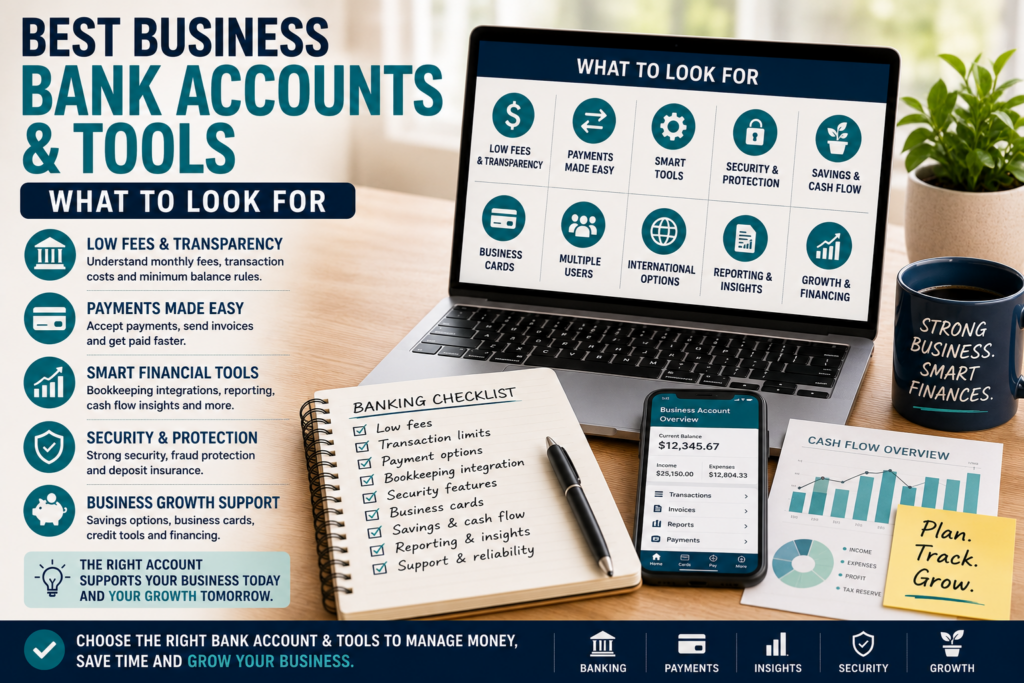
Step 19: Make a Business Banking Checklist
Before choosing a business bank account, use a checklist.
Compare:
Monthly fee
Transaction limits
Minimum balance
Payment options
Bookkeeping integration
Debit card options
Virtual cards
Cash deposit support
International payments
Security features
Customer support
Deposit protection
Savings options
Invoicing tools
Mobile app
Reporting
Future financing options
Ease of use
Then mark each feature as:
Must have
Nice to have
Not needed
This prevents you from being distracted by features that sound impressive but do not matter to your business.
For example, if you never accept cash, cash deposit support is not important.
If you sell internationally, currency fees may be very important.
If you are just starting, low fees and easy bookkeeping may matter most.
Choose based on your business, not someone else’s ranking.
Step 20: Avoid Common Business Banking Mistakes
Choosing Based Only on the Lowest Fee
Low fees are helpful, but they are not everything.
A cheap account that lacks key features may cost you time later.
Ignoring Transaction Limits
A low-fee account can become expensive if you exceed transaction limits often.
Mixing Personal and Business Money
This makes bookkeeping harder and can create confusion.
Separate early.
Forgetting About Taxes
Use a separate savings space or tracking system for tax reserves.
Not Checking Payment Compatibility
Make sure your account works with your payment processors, marketplaces and invoicing tools.
Ignoring Security
Use strong passwords, two-factor authentication and transaction alerts.
Choosing Too Much Complexity
Do not pay for features you do not need yet.
Start simple.
Never Reviewing the Account
Your first business account may not be your forever account.
Review it as your business grows.
A Simple Beginner Banking Setup
For many new small businesses, a simple setup is enough.
Example:
Business checking account
Business savings account for taxes
Debit card for business expenses
Bookkeeping or spreadsheet system
Invoice and payment tool
Receipt tracking system
Monthly review routine
This gives you a clean foundation.
Money comes in.
Expenses go out.
Taxes are reserved.
Transactions are recorded.
Receipts are saved.
Reports are easy to review.
That is what you want at the beginning.
Not complexity.
Clarity.
When Should You Upgrade Your Banking Tools?
You may need better tools when:
Transactions increase
You hire contractors or employees
You start selling internationally
You need payroll
You handle inventory
You need business financing
You accept multiple payment methods
You need better reporting
Your bookkeeping becomes too manual
You need employee cards
You want better cash flow forecasting
Your business keeps larger cash reserves
Upgrading is normal.
The banking setup that works for a side business may not work for a growing company.
Review your tools every 6 to 12 months.
Ask:
Are fees still reasonable?
Are tools saving time?
Are payments easy?
Is bookkeeping clean?
Are we secure enough?
Do we need better reporting?
Is this account still right for the business?
Your financial system should grow with your business.
Final Thoughts
The best business bank account is not always the one with the most features, the biggest name or the lowest advertised fee.
It is the one that fits your business model.
A good business bank account should help you:
Separate business and personal money
Receive payments easily
Pay expenses clearly
Track transactions
Connect to bookkeeping
Manage taxes
Protect your money
Control spending
Plan cash flow
Look professional
Grow with the business
Before choosing, compare the practical details.
Fees.
Transaction limits.
Minimum balances.
Payment options.
Security.
Bookkeeping integrations.
Support.
Deposit protection.
Mobile app quality.
Reporting.
Future financing options.
Do not rush this decision.
Your business bank account becomes part of your daily operations.
Choose one that makes money management simpler, not harder.
A strong financial foundation will not build the business for you.
But it will make the business easier to manage, easier to understand and easier to grow.
Related Articles
The First 10 Customers Plan: A Step-by-Step Guide for New Business Owners